jQuery provides a lot of tree traversal functions that we can use to get the parent, child, siblings, previous and next elements. We will look into each of jQuery tree traversal methods one by one - today we will look into two of the jQuery traversal methods i.e parent() and children().
jQuery parent() function
jQuery parent() method is used to get the direct parent element of the selected HTML element. You can perform desired actions on the parent element once it Is returned. This is the syntax for using jQuery parent():
$("child").parent()This will return the direct parent of parent element
$("child").parent(“filter”)The filter is an optional parameter passed to the parent() method.
jQuery parent() function example
Following example demonstrates the parent() method usage. jquery-parent.html
<!DOCTYPE html>
<html>
<head>
<title>jQuery Traversing Parent</title>

<script src="https://code.jquery.com/jquery-2.1.1.js"></script>
<script>
$(document).ready(function(){
  $("h4").parent().css("background-color","yellow");
});
</script>
</head>
<body>

<span>Span Element - Parent of h4 element
<h4>This is an h4 element - child of Span.</h4>
</span>

</body>
</html>
In this example, the parent element is and
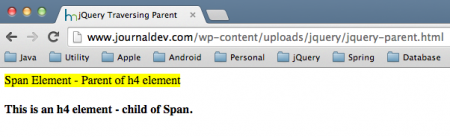
is the child element. The parent() method is used to get the direct parent element which is the element and changes the background color. The parent() method traverses only one level up the HTM DOM tree. The optional parameters provide additional filtering options to narrow down the traversal. Below image shows the output produced by above HTML page, notice the background color of span element is yellow.
Matching infrastructure at centron
Node applications need somewhere to run: ccloud³ VMs with full root access from €3.12 per month – or as a managed server if you would rather not run it yourself. Rent a cloud server →
jQuery children() function
jQuery children() method is used to get the direct children of the selected HTML element. You can use children() method to traverse through the child elements of the selected parent element. You can perform desired actions on the child elements like changing the background color, enable, disable, hide, show etc by using this method. This is the syntax for using jQuery children() function:
$("parentElement").children()This is used without any parameters. This is used return all the direct children of the parentElement.
$("parentElement").children("childElement")parentElement and childElement could be any HTML element. This will return all the matched childElement of the parentElement. The parameter, childElement in this method is optional, which provides an additional filtering option to get the child elements.
jQuery children() function example
Following example demonstrates the children() method usage. jquery-children.html
<html>
<head>
<title>jQuery Traversing Children</title>

<script src="https://code.jquery.com/jquery-2.1.1.js"></script>
<script>
$(document).ready(function(){
  //below code will run for all divs
  $("div").children("p").css("background-color","yellow");

   $("#spanParent").children("h4").css("background-color","green");
});
</script>
</head>
<body>

<div>
<h3>h3 - Child of div</h3>
<p> p -Child of div</p>
<span> Span - Child of Div</span>
<p>Second p - Child of div</p>
</div>
<p> p element - Not a child of div</p>

<span>
<h4>This is an h4 element (child of Span).</h4>
</span>

</body>
</html>
In this example, you can see two parent elements:
and . The children() method is used to get the child elements and change the color of the element. We use children method to return the child element
of the parent
element and change the color of all child
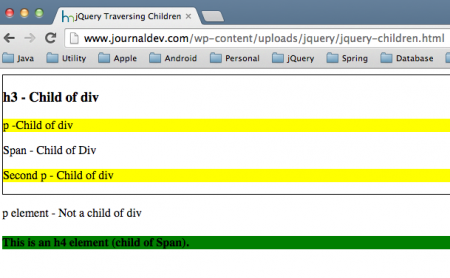
elements to yellow. Notice the p element outside the div element is not altered by this method. Likewise, span element has child element h4 and we change the color of that element in this example. The children method traverses only one level down the HTM DOM tree. This method is not used to traverse through the text nodes. Below is the output produced by the above HTML page.
That’s all for jQuery parent and children function examples, we will look into more jQuery traversal methods in coming posts.
Testen Sie Ihr Setup auf ccloud³
Registrieren Sie sich in der ccloud³ und erhalten Sie 200 € Startguthaben für Ihr Projekt – z. B. für eine PostgreSQL-VM mit automatischen Backups.