There are many ways to convert an excel file to JSON data. In this tutorial, we will look into two python modules to convert excel files to JSON.
Modules for Conversion
- excel2json-3
- Pandas
Matching infrastructure at centron
Scripts and services eventually need an environment that keeps running: ccloud³ VMs from €3.12 per month, billed by the hour. Rent a cloud server →
Converting Excel File to JSON Files using excel2json-3 Module
It’s a very simple module to convert excel files to JSON files. The contents from the excel sheet are converted to JSON string and saved in a file. The name of the files is derived from the excel sheet names. So, if there are two sheets with the name “Numbers” and “Cars”, the JSON files will be named as Numbers.json and Cars.json respectively. The module supports both .xls and .xlsx file formats for conversion. We can read the excel file from the file system as well as the URL. We can install this module using the PIP command.
$ pip install excel2json-3For our example, I have created an excel file named “records.xlsx” having three sheets.
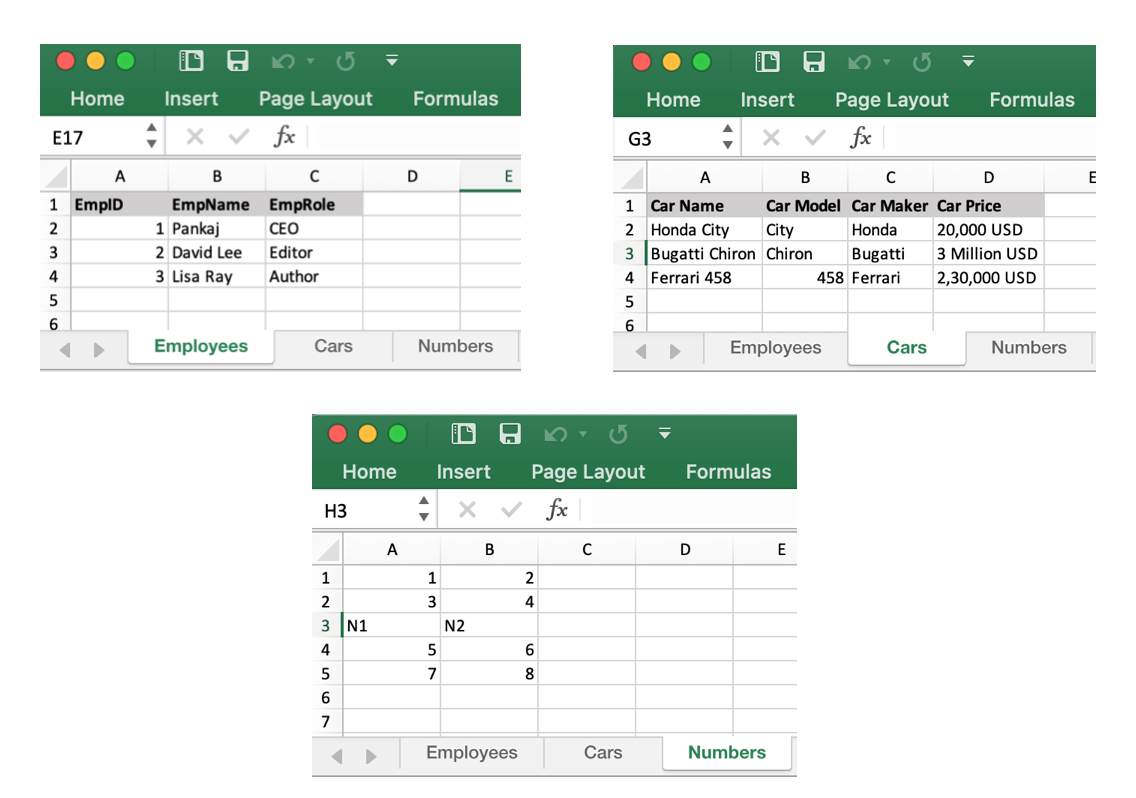
Here is the script to convert this excel file to JSON files.
import excel2json
excel2json.convert_from_file('records.xlsx')
The script creates three JSON files. Employees.json
[
    {
        "EmpID": 1.0,
        "EmpName": "Pankaj",
        "EmpRole": "CEO"
    },
    {
        "EmpID": 2.0,
        "EmpName": "David Lee",
        "EmpRole": "Editor"
    },
    {
        "EmpID": 3.0,
        "EmpName": "Lisa Ray",
        "EmpRole": "Author"
    }
]
Cars.json
[
    {
        "Car Name": "Honda City",
        "Car Model": "City",
        "Car Maker": "Honda",
        "Car Price": "20,000 USD"
    },
    {
        "Car Name": "Bugatti Chiron",
        "Car Model": "Chiron",
        "Car Maker": "Bugatti",
        "Car Price": "3 Million USD"
    },
    {
        "Car Name": "Ferrari 458",
        "Car Model": 458.0,
        "Car Maker": "Ferrari",
        "Car Price": "2,30,000 USD"
    }
]
Numbers.json
[
    {
        "1.0": 3.0,
        "2.0": 4.0
    },
    {
        "1.0": "N1",
        "2.0": "N2"
    },
    {
        "1.0": 5.0,
        "2.0": 6.0
    },
    {
        "1.0": 7.0,
        "2.0": 8.0
    }
]
If you have to read the excel file from a URL, use convert_from_url() function.
Limitations of excel2json-3 module
- The plugin has very limited features.
- There are no options to skip any sheet, rows, and columns. This makes it hard to use with bigger excel files.
- The JSON is saved into files. Most of the times, we want to convert to JSON and use it in our program rather than saving it as a file.
- The integers are getting converted to the floating point numbers.
Converting Excel Sheet to JSON String using Pandas Module
Pandas module provides functions to read excel sheets into DataFrame object. There are many options to specify headers, read specific columns, skip rows, etc. We can use the to_json() function to convert the DataFrame object to JSON string. Let’s look at a simple example to read the “Employees” sheet and convert it to JSON string.
import pandas

excel_data_df = pandas.read_excel('records.xlsx', sheet_name='Employees')

json_str = excel_data_df.to_json()

print('Excel Sheet to JSON:\n', json_str)
Output:
Excel Sheet to JSON:
{"EmpID":...}
So, the JSON data is created with the orientation of columns. If you want to create the JSON string with row-wise orientation, pass the “orient” parameter value as “records”.
json_str = excel_data_df.to_json(orient='records')Output:
Excel Sheet to JSON:
[{"EmpID":1,"EmpName":"Pankaj","EmpRole":"CEO"},...]
Conclusion
If you have a simple and well-structured excel file and you want to convert it to JSON files, use the excel2json-3 module. But, if you want more control on the way the excel data is read and converted to JSON string, use the pandas’ module.
Testen Sie Ihr Setup auf ccloud³
Registrieren Sie sich in der ccloud³ und erhalten Sie 200 € Startguthaben für Ihr Projekt – z. B. für eine PostgreSQL-VM mit automatischen Backups.