Python join list means concatenating a list of strings with a specified delimiter to form a string. Sometimes it’s useful when you have to convert list to string. For example, convert a list of alphabets to a comma-separated string to save in a file.
Try it yourself: cloud servers from €3.12/month
ccloud³ VMs from German data centers – deployed in seconds, billed by the hour, with a €200 starting credit for new accounts. Launch a server →
We can use python string join() function to join a list of strings. This function takes iterable as argument and List is an iterable, so we can use it with List. Also, the list should contain strings, if you will try to join a list of ints then you will get an error message as TypeError: sequence item 0: expected str instance, int found. Let’s look at a short example for joining list in python to create a string.
vowels = ["a", "e", "i", "o", "u"]

vowelsCSV = ",".join(vowels)

print("Vowels are = ", vowelsCSV)
When we run the above program, it will produce the following output.
Vowels are = a,e,i,o,uPython Join Two Strings
We can use join() function to join two strings too.
message = "Hello ".join("World")

print(message) #prints 'Hello World'
Why Join() Function is in String and Not in List?
One question arises with many python developers is why the join() function is part of String and not list. Wouldn’t below syntax be more easy to remember and use?
vowelsCSV = vowels.join(",")There is a popular StackOverflow question around this, here I am listing the most important points from the discussions that makes total sense to me.
The main reason is that join() function can be used with any iterable and result is always a String, so it makes sense to have this function in String API rather than having it in all the iterable classes.
Joining List of Multiple Data-Types
Let’s look at a program where we will try to join list items having multiple data types.
names = ['Java', 'Python', 1]
delimiter = ','
single_str = delimiter.join(names)
print('String: {0}'.format(single_str))
Output:
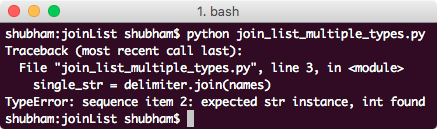
This was just a demonstration that a list which contains multiple data-types cannot be combined into a single String with join() function. List must contain only the String values.
Split String Using Join Function
We can use join() function to split a string with specified delimiter too.
names = 'Python'
delimiter = ','
single_str = delimiter.join(names)
print('String: {0}'.format(single_str))
Output:
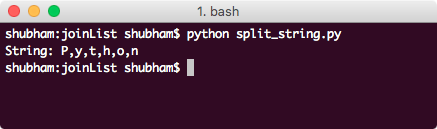
This shows that when String is passed as an argument to join() function, it splits it by character and with the specified delimiter.
Using Split() Function
Apart from splitting with the join() function, split() function can be used to split a String as well which works almost the same way as the join() function. Let’s look at a code snippet:
names = ['Java', 'Python', 'Go']
delimiter = ','
single_str = delimiter.join(names)
print('String: {0}'.format(single_str))

split = single_str.split(delimiter)
print('List: {0}'.format(split))
Output:
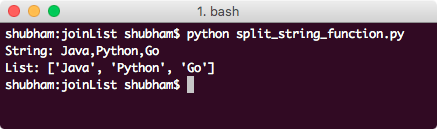
We used the same delimiter to split the String again to back to the original list.
Splitting Only N Times
The split() function we demonstrated in the last example also takes an optional second argument which signifies the number of times the split operation should be performed. Here is a sample program to demonstrate its usage:
names = ['Java', 'Python', 'Go']
delimiter = ','
single_str = delimiter.join(names)
print('String: {0}'.format(single_str))

split = single_str.split(delimiter, 1)
print('List: {0}'.format(split))
Output:
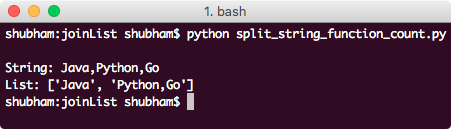
This time, split operation was performed only one time as we provided in the split() function parameter. That’s all for joining a list to create a string in python and using split() function to get the original list again.
Testen Sie Ihr Setup auf ccloud³
Registrieren Sie sich in der ccloud³ und erhalten Sie 200 € Startguthaben für Ihr Projekt – z. B. für eine PostgreSQL-VM mit automatischen Backups.