Spring @Repository annotation is used to indicate that the class provides the mechanism for storage, retrieval, search, update and delete operation on objects.
Spring Repository annotation is a specialization of @Component annotation, so Spring Repository classes are autodetected by spring framework through classpath scanning. Spring Repository is very close to DAO pattern where DAO classes are responsible for providing CRUD operations on database tables. However, if you are using Spring Data for managing database operations, then you should use Spring Data Repository interface.
Spring Repository Example
Let’s look at a simple example where we will create a Spring Repository class. We will not use database operations, rather we will provide a repository for an Object. Create a maven project in Eclipse or any other IDE you use, then add spring core dependency.
<dependency>
	<groupId>org.springframework</groupId>
	<artifactId>spring-context</artifactId>
	<version>5.0.6.RELEASE</version>
</dependency>
Below image shows our final project structure in Eclipse.
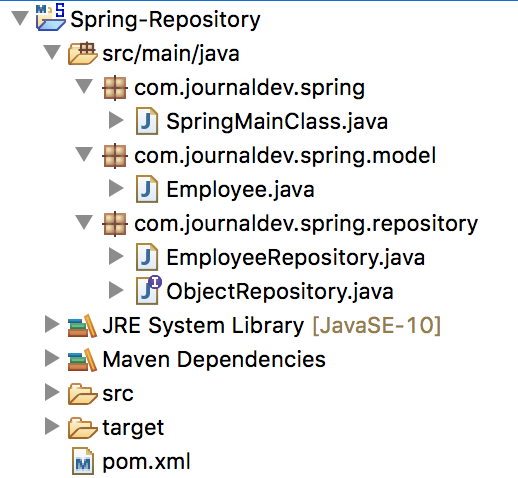
Let’s create the model class for which we will implement a spring repository.
package com.journaldev.spring.model;

public class Employee {

	private int id;
	private String name;
	private String jobTitle;

	public Employee() {
	}

	public Employee(int i, String n, String jt) {
		this.id = i;
		this.name = n;
		this.jobTitle = jt;
	}

	public int getId() {
		return id;
	}

	public void setId(int id) {
		this.id = id;
	}

	public String getName() {
		return name;
	}

	public void setName(String name) {
		this.name = name;
	}

	public String getJobTitle() {
		return jobTitle;
	}

	public void setJobTitle(String jobTitle) {
		this.jobTitle = jobTitle;
	}

	@Override
	public String toString() {
		return id + "," + name + "," + jobTitle;
	}
}
Before we implement Repository class, I have created a generic ObjectRepository interface to provide the contract for our repository class to implement.
package com.journaldev.spring.repository;

public interface ObjectRepository<T> {

	public void store(T t);

	public T retrieve(int id);

	public T search(String name);

	public T delete(int id);
}
I am using Generics here, it’s a powerful technology to provide loosely coupled contract for the applications to implement. Now let’s look at our Repository class implementation.
package com.journaldev.spring.repository;

import java.util.Collection;
import java.util.HashMap;
import java.util.Map;

import org.springframework.stereotype.Repository;

import com.journaldev.spring.model.Employee;

@Repository
public class EmployeeRepository implements ObjectRepository<Employee> {

	private Map<Integer, Employee> repository;

	public EmployeeRepository() {
		this.repository = new HashMap<>();
	}

	@Override
	public void store(Employee emp) {
		repository.put(emp.getId(), emp);
	}

	@Override
	public Employee retrieve(int id) {
		return repository.get(id);
	}

	@Override
	public Employee search(String name) {
		Collection<Employee> emps = repository.values();
		for (Employee emp : emps) {
			if (emp.getName().equalsIgnoreCase(name))
				return emp;
		}
		return null;
	}

	@Override
	public Employee delete(int id) {
		Employee e = repository.get(id);
		this.repository.remove(id);
		return e;
	}

}
Note that I am using an in-memory Map to store the object data, you can use any other mechanisms too.
Matching infrastructure at centron
Node applications need somewhere to run: ccloud³ VMs with full root access from €3.12 per month – or as a managed server if you would rather not run it yourself. Rent a cloud server →
Spring Repository Test
Our Spring Repository is ready, let’s create a main class and test it out.
package com.journaldev.spring;

import java.sql.SQLException;

import org.springframework.context.annotation.AnnotationConfigApplicationContext;

import com.journaldev.spring.model.Employee;
import com.journaldev.spring.repository.EmployeeRepository;

public class SpringMainClass {

	public static void main(String[] args) throws SQLException {
		AnnotationConfigApplicationContext context = new AnnotationConfigApplicationContext();
		context.scan("com.journaldev.spring");
		context.refresh();

		EmployeeRepository repository = context.getBean(EmployeeRepository.class);

		// store
		repository.store(new Employee(1, "Pankaj", "CEO"));
		repository.store(new Employee(2, "Anupam", "Editor"));
		repository.store(new Employee(3, "Meghna", "CFO"));

		// retrieve
		Employee emp = repository.retrieve(1);
		System.out.println(emp);

		// search
		Employee cfo = repository.search("Meghna");
		System.out.println(cfo);

		// delete
		Employee editor = repository.delete(2);
		System.out.println(editor);

		// close the spring context
		context.close();
	}

}
Just run the class as Java Application and you should get following output.
1,Pankaj,CEO
3,Meghna,CFO
2,Anupam,EditorTesten Sie Ihr Setup auf ccloud³
Registrieren Sie sich in der ccloud³ und erhalten Sie 200 € Startguthaben für Ihr Projekt – z. B. für eine PostgreSQL-VM mit automatischen Backups.