Welcome to Struts Tutorial for Beginners. Struts is one of the oldest frameworks to build Java Web Application.
Struts Tutorial
Struts was the initial implementation of MVC design pattern and it has evolved a lot along with latest enhancements in Java, Java EE technologies. Struts tutorial article is aimed to provide basic details of Struts 2 and how we can create our first “Hello World” Struts 2 application.
Struts 2
Apache Struts 2 is an open source, industry standard, flexible and extendable framework to build Java EE web application. Struts 2 is based on OpenSymphony WebWork framework. Struts 2 is very flexible in terms of development and configurations and we will see how easy it is to develop a web application using Struts 2 framework.
Struts 2 Architecture Diagram
Below diagram shows different component of Struts 2 in a web application.
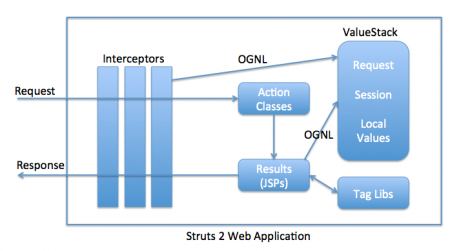
Struts 2 Interceptors
Struts Interceptors are like Servlet Filters that executes before and after the request is being processed. They are used to perform common operations for different actions. For example logging, session validation, adding common headers to response etc.
Struts 2 ValueStack and OGNL
ValueStack is the storage area where the application data is stored by Struts 2 for processing a client request. The data is stored in ActionContext objects that use ThreadLocal to have values specific to the particular request thread. Object-Graph Navigation Language (OGNL) is a powerful Expression Language that is used to manipulate data stored on the ValueStack. As you can see in architecture diagram, both interceptors and result pages can access data stored on ValueStack using OGNL.
Struts 2 Action
Struts 2 Action components handle the client requests. Struts 2 provides different ways to create Action classes.
- By implementing com.opensymphony.xwork2.Action interface.
- By extending com.opensymphony.xwork2.ActionSupport class. Usually it’s used to create empty action classes to forward request to another resource.
- Annotating a class with @Action or @Actions annotation.
- Following naming convention for classes, name should end with Action and should have execute() method.
Struts 2 Result
Result components are usually JSP or HTML pages to create view for client response. Struts 2 provides their own tags that we can use in JSP pages to create response. Struts tags are great example of JSP Custom Tags.
Struts 2 Declarative Architecture and Wiring
Struts 2 provides two ways to configure our application for action classes and result pages.
- Struts XML File: We have struts.xml file in WEB-INF/classes directory where we can configure our application action classes and result pages.
- Annotation: We can use Java Annotations to provide metadata information about a class. Struts 2 convention plugin can be used to annotate java classes with @Action and @Result annotations to create configure action classes and associated result pages.
Whichever way we use to configure our application, the end result will always be the same.
Matching infrastructure at centron
Java applications in continuous operation: ccloud³ VMs from €3.12 per month with full root access, billed by the hour. Rent a cloud server →
Struts Tutorial - Hello World XML Based Application
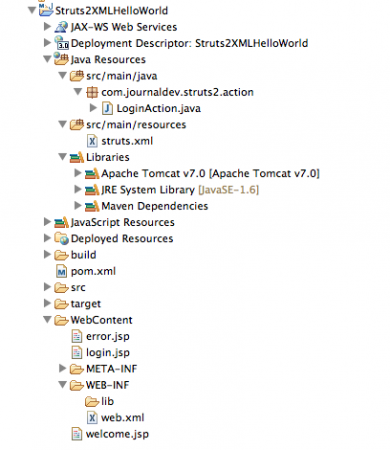
Let’s see how we can create our first Struts 2 Hello World application. First of all we need is Struts 2 jar files, the easiest way is to download it from Struts 2 Official Downloads page. But when you will check out the libs in the downloaded archive, you will see a lot of jar files that we don’t need for our simple application. So I will create a maven project and add struts-core dependency only, all the other transitive dependency jars will be automatically downloaded and added to the application. Our final project structure will be like below image.
Create a new Dynamic Web Project Struts2XMLHelloWorld in Eclipse and then convert it to maven project like below image.
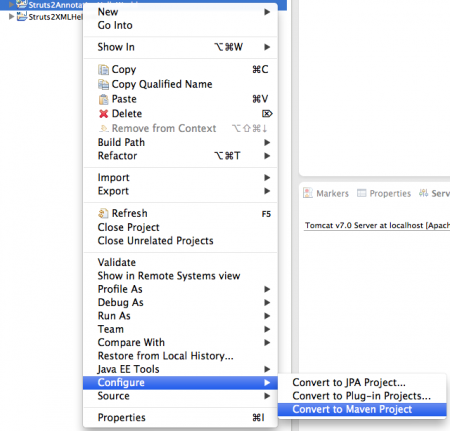
You will notice pom.xml file is added in the root directory of the project. Our project setup in Eclipse is ready, let’s look at the different components in order.
pom.xml
Open pom.xml file and add struts core dependency, the final pom.xml will look like below.
<project xmlns="https://maven.apache.org/POM/4.0.0" xmlns:xsi="https://www.w3.org/2001/XMLSchema-instance"
    xsi:schemaLocation="https://maven.apache.org/POM/4.0.0 https://maven.apache.org/xsd/maven-4.0.0.xsd">
    <modelVersion>4.0.0</modelVersion>
    <groupId>Struts2XMLHelloWorld</groupId>
    <artifactId>Struts2XMLHelloWorld</artifactId>
    <version>0.0.1-SNAPSHOT</version>
    <packaging>war</packaging>

    <dependencies>
        <dependency>
            <groupId>org.apache.struts</groupId>
            <artifactId>struts2-core</artifactId>
            <version>2.3.15.1</version>
        </dependency>
    </dependencies>
    <build>
        <sourceDirectory>src</sourceDirectory>
        <plugins>
            <plugin>
                <artifactId>maven-compiler-plugin</artifactId>
                <version>3.1</version>
                <configuration>
                    <source>1.6</source>
                    <target>1.6</target>
                </configuration>
            </plugin>
            <plugin>
                <artifactId>maven-war-plugin</artifactId>
                <version>2.3</version>
                <configuration>
                    <warSourceDirectory>WebContent</warSourceDirectory>
                    <failOnMissingWebXml>false</failOnMissingWebXml>
                </configuration>
            </plugin>
        </plugins>
        <finalName>${project.artifactId}</finalName>
    </build>
</project>
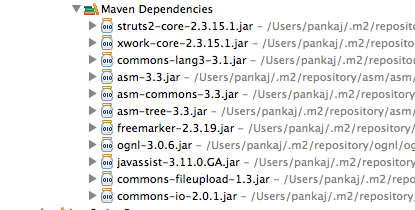
Notice that I have overridden finalName element to avoid version number getting added in the WAR file when we do maven build. Other parts are added by Eclipse itself, the only dependency we need is struts2-core whose current version is 2.3.15.1 (as of 10-Sep-2013). Just do maven build of the application and you will see a lot of jars added to the application lib directory and shown in Maven Dependencies section of the project like below image.
Struts 2 web.xml configuration
We need to add org.apache.struts2.dispatcher.ng.filter.StrutsPrepareAndExecuteFilter filter to the web application and provide the URL pattern where we want Struts to take care of the client request. Our web.xml looks like below;
<?xml version="1.0" encoding="UTF-8"?>
<web-app xmlns:xsi="https://www.w3.org/2001/XMLSchema-instance"
    xmlns="https://java.sun.com/xml/ns/javaee"
    xsi:schemaLocation="https://java.sun.com/xml/ns/javaee https://java.sun.com/xml/ns/javaee/web-app_3_0.xsd"
    version="3.0">
    <display-name>Struts2XMLHelloWorld</display-name>

    <filter>
        <filter-name>struts2</filter-name>
        <filter-class>org.apache.struts2.dispatcher.ng.filter.StrutsPrepareAndExecuteFilter</filter-class>
    </filter>

    <filter-mapping>
        <filter-name>struts2</filter-name>
        <url-pattern>/*</url-pattern>
    </filter-mapping>
</web-app>
For Struts 2 version below 2.1.3, the filter-class was org.apache.struts2.dispatcher.FilterDispatcher.
Struts Tutorial - Result Pages
We have three JSP pages that will be used by the application, we are using Struts 2 tags to create our JSP pages. login.jsp
<%@ page language="java" contentType="text/html; charset=US-ASCII"
    pageEncoding="US-ASCII"%>
<!DOCTYPE html PUBLIC "-//W3C//DTD HTML 4.01 Transitional//EN" "https://www.w3.org/TR/html4/loose.dtd">
<%-- Using Struts2 Tags in JSP --%>
<%@ taglib uri="/struts-tags" prefix="s"%>
<html>
<head>
<meta http-equiv="Content-Type" content="text/html; charset=US-ASCII">
<title>Login Page</title>
</head>
<body>
<h3>Welcome User, please login below</h3>
<s:form action="login">
    <s:textfield name="name" label="User Name"></s:textfield>
    <s:textfield name="pwd" label="Password" type="password"></s:textfield>
    <s:submit value="Login"></s:submit>
</s:form>
</body>
</html>
Notice the form field names are name and pwd, we will see how they are used in Action classes. welcome.jsp
<%@ page language="java" contentType="text/html; charset=US-ASCII"
    pageEncoding="US-ASCII"%>
<%@ taglib uri="/struts-tags" prefix="s"%>
<!DOCTYPE html PUBLIC "-//W3C//DTD HTML 4.01 Transitional//EN" "https://www.w3.org/TR/html4/loose.dtd">
<html>
<head>
<meta http-equiv="Content-Type" content="text/html; charset=US-ASCII">
<title>Welcome Page</title>
</head>
<body>
<h3>Welcome <s:property value="name"></s:property></h3>
</body>
</html>
Notice the struts tag s:property that we can use to get request attributes, the name is same as in login.jsp. error.jsp
<%@ page language="java" contentType="text/html; charset=US-ASCII"
    pageEncoding="US-ASCII"%>
<%@ taglib uri="/struts-tags" prefix="s"%>

<!DOCTYPE html PUBLIC "-//W3C//DTD HTML 4.01 Transitional//EN" "https://www.w3.org/TR/html4/loose.dtd">
<html>
<head>
<meta http-equiv="Content-Type" content="text/html; charset=US-ASCII">
<title>Error Page</title>
</head>
<body>
<h4>User Name or Password is wrong</h4>
<s:include value="login.jsp"></s:include>
</body>
</html>
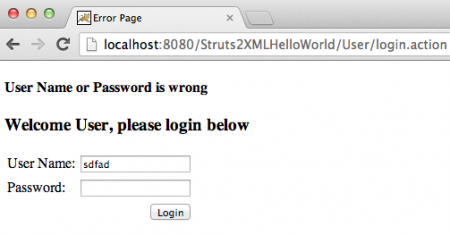
This is a simple JSP page where we are adding error message and including login page in response.
Struts Tutorial - Action Classes
Our application has only one Action class where we are implementing Struts 2 Action interface. LoginAction.java
package com.journaldev.struts2.action;

import com.opensymphony.xwork2.Action;

public class LoginAction implements Action {

	@Override
	public String execute() throws Exception {
		if("pankaj".equals(getName()) && "admin".equals(getPwd()))
		return "SUCCESS";
		else return "ERROR";
	}

	//Java Bean to hold the form parameters
	private String name;
	private String pwd;
	public String getName() {
		return name;
	}
	public void setName(String name) {
		this.name = name;
	}
	public String getPwd() {
		return pwd;
	}
	public void setPwd(String pwd) {
		this.pwd = pwd;
	}

}
Notice the action class is also a java bean with same variables as login.jsp and their getter and setter methods. Struts will take care of mapping the request parameters to the action class variables.
Struts Tutorial - Configuration File
Since we are using XML based configuration for wiring our application, we need to create Struts configuration file that should be named as struts.xml and inside WEB-INF/classes directory. struts.xml
<?xml version="1.0" encoding="UTF-8"?>

<!DOCTYPE struts PUBLIC
    "-//Apache Software Foundation//DTD Struts Configuration 2.3//EN"
    "https://struts.apache.org/dtds/struts-2.3.dtd">
<struts>

<package name="user" namespace="/User" extends="struts-default">
    <action name="home">
        <result>/login.jsp</result>
    </action>
    <action name="login">
    <result name="SUCCESS">/welcome.jsp</result>
    <result name="ERROR">/error.jsp</result>
    </action>

</package>

</struts>
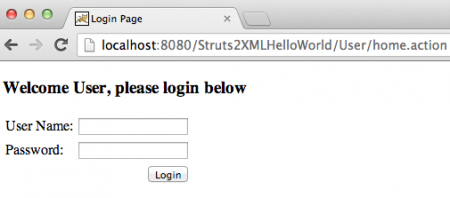
For action “home”, there is no Action class and only one result, so request will be forwarded to the login.jsp page. For action “login”, LoginAction is the action class and if execute() method returns “SUCCESS” the request will be processed by welcome.jsp and for “ERROR” it will be forwarded to error.jsp page. namespace=“/User” is important and used in URL to access the action classes, it’s provided to create different modules. So we can access our application with URL https://localhost:8080/Struts2XMLHelloWorld/User/home.action. Notice that URL is ending with .action that is the default suffix for Struts 2 action like it is .do for Struts 1.
Struts Tutorial - Struts 2 Hello World Test
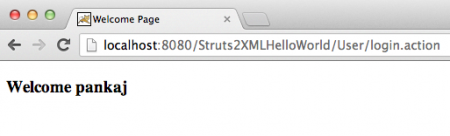
When we run our application, we get following response pages.
Testen Sie Ihr Setup auf ccloud³
Registrieren Sie sich in der ccloud³ und erhalten Sie 200 € Startguthaben für Ihr Projekt – z. B. für eine PostgreSQL-VM mit automatischen Backups.