In this tutorial, we are going to focus on the randint()-method in Python. In our previous tutorials, we saw different random number generating methods defined inside the random module in our Random Number Tutorial in Python.
So, as you already know, we need to import the random module in Python first to begin using the randint()-method in Python. The module essentially creates pseudo-randomness.
The randint()-method in Python Syntax
Basically, the randint()-method in Python returns a random integer value between the two lower and higher limits (including both limits) provided as two parameters.
It should be noted that this method is only capable of generating integer-type random value. Take a look at the syntax so that we can further incorporate the method.
randint() Syntax
randint(lower limit , upper limit)Here,
- lower limit is the starting point from and including which the random integer would be generated,
- upper limit is the stopping point up to which the method would return the random integer.
The above example returns an integer N where N>=beg and N<=end.
It works in the same way randrange(beg,end) does, and hence is an alias for the same.
Matching infrastructure at centron
Node applications need somewhere to run: ccloud³ VMs with full root access from €3.12 per month – or as a managed server if you would rather not run it yourself. Rent a cloud server →
The randint()-method in Python Example
Let us look at the given code below, it illustrates the use and working of the randint() method.
import random
beg=10
end=100
random_integer = random.randint(beg, end)
print("The random integer is :", random_integer)
Output:
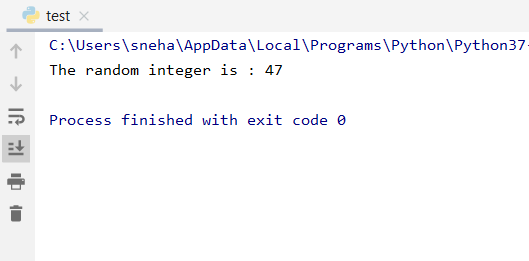
Clearly, we can see that the randint() method generates a random integer value within the limit 1-100.
Is this value random? What happens when we call the method multiple times? Does it return the same value?
Multiple randint()-method in Python Call
The code snippet below answers all the above-mentioned questions and gives us a clear understanding.
import random
beg=10
end=100
for i in range(5):
    print(random.randint(beg, end))
Output:
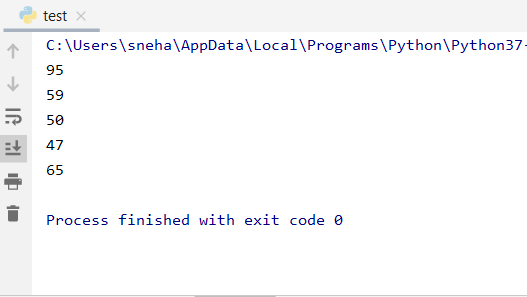
For the above code, repeating the random.randint() method gives us different random integers for each call within the limit 10 to 100.
Hence, we can infer that the values are random for each call and do not overlap in our case. Furthermore, when the number of calls is large and the range is quite smaller, in that case, the random values generated may collide or overlap.
As said earlier, one must ensure that the higher and lower limit parameters have to be an integer type. For other types, we get a ValueError as shown below.
import random
beg=5.3
end=10.2
print(random.randint(beg, end))
Output:
Traceback (most recent call last):
  File "C:/Users/sneha/Desktop/test.py", line 4, in <module>
    print(random.randint(beg, end))
  File "C:\\Users\\sneha\\AppData\\Local\\Programs\\Python\\Python37-32\\lib\\random.py", line 222, in randint
    return self.randrange(a, b+1)
  File "C:\\Users\\sneha\\AppData\\Local\\Programs\\Python\\Python37-32\\lib\\random.py", line 186, in randrange
    raise ValueError("non-integer arg 1 for randrange()")
ValueError: non-integer arg 1 for randrange()
Process finished with exit code 1
Conclusion
I hope this brief tutorial on the randint()-method in Python has made the function clear for you. Your feedback is always welcome through the comments.
Testen Sie Ihr Setup auf ccloud³
Registrieren Sie sich in der ccloud³ und erhalten Sie 200 € Startguthaben für Ihr Projekt – z. B. für eine PostgreSQL-VM mit automatischen Backups.