Spring ist eines der am meisten verwendeten Java EE Frameworks und Hibernate ist das beliebteste ORM-Framework. Deshalb wird die Kombination aus Spring und Hibernate häufig in Unternehmensanwendungen eingesetzt.
Spring Hibernate
In diesem Tutorial werden wir heute Spring 4 verwenden und es mit Hibernate 3 integrieren, und dann dasselbe Projekt aktualisieren, um Hibernate 4 zu verwenden. Da es viele Versionen sowohl für Spring als auch für Hibernate gibt und das Spring ORM-Artefakt sowohl Hibernate 3 als auch Hibernate 4 unterstützt, ist es gut, dass ich alle Abhängigkeiten aufliste, die ich in meinem Projekt verwendet habe. Beachten Sie, dass ich festgestellt habe, dass nicht alle Spring- und Hibernate-Versionen kompatibel sind. Die unten aufgeführten Versionen haben bei mir funktioniert, also denke ich, dass sie kompatibel sind. Wenn Sie andere Versionen verwenden und java.lang.NoClassDefFoundError erhalten, bedeutet dies, dass sie nicht kompatibel sind. Meistens liegt das daran, dass Hibernate-Klassen von einem Paket in ein anderes verschoben wurden, was diesen Fehler verursacht. Zum Beispiel wurde die Klasse org.hibernate.engine.FilterDefinition in neueren Hibernate-Versionen nach org.hibernate.engine.spi.FilterDefinition verschoben.
- Spring Framework-Version: 4.0.3.RELEASE
- Hibernate Core und Hibernate EntityManager-Version: 3.6.9.Final und 4.3.5.Final
- Spring ORM-Version: 4.0.3.RELEASE
Passende Infrastruktur bei centron
Node-Anwendungen wollen deployt werden: ccloud³ VMs mit vollem Root-Zugriff ab 3,12 € im Monat – oder gleich als Managed Server, wenn der Betrieb nicht bei Ihnen liegen soll. Cloud Server mieten →
Datenbankeinrichtung
Ich verwende eine MySQL-Datenbank für mein Projekt, daher wird das untenstehende setup.sql-Skript die notwendige Tabelle für dieses Beispiel erstellen.
CREATE TABLE `Person` (
  `id` int(11) unsigned NOT NULL AUTO_INCREMENT,
  `name` varchar(20) NOT NULL DEFAULT '',
  `country` varchar(20) DEFAULT NULL,
  PRIMARY KEY (`id`)
) ENGINE=InnoDB AUTO_INCREMENT=5 DEFAULT CHARSET=utf8;
commit;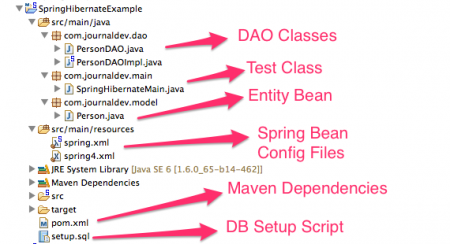
Maven Dependencies for Spring Hibernate Integration
We will first look into our pom.xml file for all the required dependencies and their versions.
Important Dependencies for Spring and Hibernate Integration Project are:
<project xmlns="https://maven.apache.org/POM/4.0.0" xmlns:xsi="https://www.w3.org/2001/XMLSchema-instance"
    xsi:schemaLocation="https://maven.apache.org/POM/4.0.0 https://maven.apache.org/xsd/maven-4.0.0.xsd">
    <modelVersion>4.0.0</modelVersion>
    <groupId>org.springframework.samples</groupId>
    <artifactId>SpringHibernateExample</artifactId>
    <version>0.0.1-SNAPSHOT</version>

    <properties>
        <!-- Generic properties -->
        <java.version>1.6</java.version>
        <project.build.sourceEncoding>UTF-8</project.build.sourceEncoding>
        <project.reporting.outputEncoding>UTF-8</project.reporting.outputEncoding>

        <!-- Spring -->
        <spring-framework.version>4.0.3.RELEASE</spring-framework.version>

        <!-- Hibernate / JPA -->
        <!-- <hibernate.version>4.3.5.Final</hibernate.version> -->
        <hibernate.version>3.6.9.Final</hibernate.version>

        <!-- Logging -->
        <logback.version>1.0.13</logback.version>
        <slf4j.version>1.7.5</slf4j.version>
    </properties>

    <dependencies>
        <!-- Spring and Transactions -->
        <dependency>
            <groupId>org.springframework</groupId>
            <artifactId>spring-context</artifactId>
            <version>${spring-framework.version}</version>
        </dependency>
        <dependency>
            <groupId>org.springframework</groupId>
            <artifactId>spring-tx</artifactId>
            <version>${spring-framework.version}</version>
        </dependency>

        <!-- Spring ORM support -->
        <dependency>
            <groupId>org.springframework</groupId>
            <artifactId>spring-orm</artifactId>
            <version>${spring-framework.version}</version>
        </dependency>

        <!-- Logging with SLF4J & LogBack -->
        <dependency>
            <groupId>org.slf4j</groupId>
            <artifactId>slf4j-api</artifactId>
            <version>${slf4j.version}</version>
            <scope>compile</scope>
        </dependency>
        <dependency>
            <groupId>ch.qos.logback</groupId>
            <artifactId>logback-classic</artifactId>
            <version>${logback.version}</version>
            <scope>runtime</scope>
        </dependency>

        <!-- Hibernate -->
        <dependency>
            <groupId>org.hibernate</groupId>
            <artifactId>hibernate-entitymanager</artifactId>
            <version>${hibernate.version}</version>
        </dependency>
        <dependency>
            <groupId>org.hibernate</groupId>
            <artifactId>hibernate-core</artifactId>
            <version>${hibernate.version}</version>
        </dependency>

        <dependency>
            <groupId>mysql</groupId>
            <artifactId>mysql-connector-java</artifactId>
            <version>5.1.9</version>
        </dependency>
        <dependency>
            <groupId>commons-dbcp</groupId>
            <artifactId>commons-dbcp</artifactId>
            <version>1.4</version>
        </dependency>
    </dependencies>
</project>- spring-context and spring-tx for core Spring functionalities. Notice that I am using version 4.0.3.RELEASE.
- spring-orm dependency for Spring ORM support, it’s required for hibernate integration in our spring project.
- hibernate-entitymanager and hibernate-core dependencies for Hibernate framework. Notice that version is 3.6.9.Final, for using Hibernate 4 all we need is to change it to 4.3.5.Final as commented in above pom.xml file.
- mysql-connector-java for MySQL driver for database connection.
Model Class or Entity Bean with JPA Annotations
We can use Hibernate XML based mapping as well as JPA annotation based mapping. Here I am using JPA annotations for mapping because Hibernate provides JPA implementation.
package com.journaldev.model;

import javax.persistence.Column;
import javax.persistence.Entity;
import javax.persistence.GeneratedValue;
import javax.persistence.GenerationType;
import javax.persistence.Id;
import javax.persistence.Table;

/**
 * Entity bean with JPA annotations
 * Hibernate provides JPA implementation
 * @author pankaj
 *
 */
@Entity
@Table(name="Person")
public class Person {

    @Id
    @Column(name="id")
    @GeneratedValue(strategy=GenerationType.IDENTITY)
    private int id;

    private String name;

    private String country;

    public int getId() {
        return id;
    }

    public void setId(int id) {
        this.id = id;
    }

    public String getName() {
        return name;
    }

    public void setName(String name) {
        this.name = name;
    }

    public String getCountry() {
        return country;
    }

    public void setCountry(String country) {
        this.country = country;
    }

    @Override
    public String toString(){
        return "id="+id+", name="+name+", country="+country;
    }
}
DAO Interface
We will implement two methods in our DAO classes, first to save the Person object into the table and second that will fetch all the records from the table and returns the list of Persons.
package com.journaldev.dao;

import java.util.List;
import com.journaldev.model.Person;

public interface PersonDAO {
    public void save(Person p);
    public List<Person> list();
}
Above DAO class implementation would be like below.
package com.journaldev.dao;

import java.util.List;
import org.hibernate.Session;
import org.hibernate.SessionFactory;
import org.hibernate.Transaction;
import com.journaldev.model.Person;

public class PersonDAOImpl implements PersonDAO {
    private SessionFactory sessionFactory;

    public void setSessionFactory(SessionFactory sessionFactory) {
        this.sessionFactory = sessionFactory;
    }

    @Override
    public void save(Person p) {
        Session session = this.sessionFactory.openSession();
        Transaction tx = session.beginTransaction();
        session.persist(p);
        tx.commit();
        session.close();
    }

    @SuppressWarnings("unchecked")
    @Override
    public List<Person> list() {
        Session session = this.sessionFactory.openSession();
        List<Person> personList = session.createQuery("from Person").list();
        session.close();
        return personList;
    }
}
Notice that this is the only place where we are using Hibernate related classes. This pattern makes our implementation flexible and easy to migrate from one technology to another. For example, if we want to use iBatis ORM framework, all we need is to provide a DAO implementation for iBatis and then change the spring bean configuration file. In above example, I am using Hibernate session transaction management. But we can also use Spring declarative transaction management using @Transactional annotation
Spring Bean Configuration File for Hibernate 3 Integration
<?xml version="1.0" encoding="UTF-8"?>
<beans xmlns="https://www.springframework.org/schema/beans"
    xmlns:xsi="https://www.w3.org/2001/XMLSchema-instance" xmlns:aop="https://www.springframework.org/schema/aop"
    xmlns:tx="https://www.springframework.org/schema/tx"
    xsi:schemaLocation="https://www.springframework.org/schema/beans https://www.springframework.org/schema/beans/spring-beans.xsd
        https://www.springframework.org/schema/aop https://www.springframework.org/schema/aop/spring-aop-4.0.xsd
        https://www.springframework.org/schema/tx https://www.springframework.org/schema/tx/spring-tx-4.0.xsd">

    <bean
        destroy-method="close">
        <property name="driverClassName" value="com.mysql.jdbc.Driver" />
        <property name="url" value="jdbc:mysql://localhost:3306/TestDB" />
        <property name="username" value="pankaj" />
        <property name="password" value="pankaj123" />
    </bean>

    <!-- Hibernate 3 XML SessionFactory Bean definition-->
    <!--  <bean
       >
        <property name="dataSource" ref="dataSource" />
        <property name="mappingResources">
            <list>
                <value>person.hbm.xml</value>
            </list>
        </property>
        <property name="hibernateProperties">
            <value>
                hibernate.dialect=org.hibernate.dialect.MySQLDialect
            </value>
        </property>
    </bean> -->

    <!-- Hibernate 3 Annotation SessionFactory Bean definition-->
    <bean
       >
        <property name="dataSource" ref="dataSource" />
        <property name="annotatedClasses">
            <list>
                <value>com.journaldev.model.Person</value>
            </list>
        </property>
        <property name="hibernateProperties">
            <props>
                <prop key="hibernate.dialect">org.hibernate.dialect.MySQLDialect</prop>
                <prop key="hibernate.current_session_context_class">thread</prop>
                <prop key="hibernate.show_sql">false</prop>
            </props>
        </property>
    </bean>

    <bean>
        <property name="sessionFactory" ref="hibernate3AnnotatedSessionFactory" />
    </bean>
</beans>
There are two ways we can provide database connection details to Hibernate, first by passing everything in hibernateProperties and second by creating a DataSource and then passing it to hibernate. I prefer the second approach, that’s why we have Apache Commons DBCP dependency to create a BasicDataSource by setting database connection properties. For Spring and Hibernate 3 integration, Spring ORM provides two classes - org.springframework.orm.hibernate3.LocalSessionFactoryBean when hibernate mappings are XML based and org.springframework.orm.hibernate3.annotation.AnnotationSessionFactoryBean for annotations based mapping. I have provided simple bean configuration of LocalSessionFactoryBean in comments, if you are using XML based mappings. AnnotationSessionFactoryBean extends LocalSessionFactoryBean class, so it has all the basic properties for hibernate integration. The properties are self understood and mostly hibernate related, so I will not go into much detail for them. But if you are wondering from where hibernateProperties, annotatedClasses are coming, you need to look into the bean class source code. Notice the bean definition of personDAO, like I said earlier if we have to switch to some other ORM framework, we need to change the implementation class here and set any other properties we need.
Spring 4 Hibernate 3 Test Program
package com.journaldev.main;

import java.util.List;
import org.springframework.context.support.ClassPathXmlApplicationContext;
import com.journaldev.dao.PersonDAO;
import com.journaldev.model.Person;

public class SpringHibernateMain {
    public static void main(String[] args) {
        ClassPathXmlApplicationContext context = new ClassPathXmlApplicationContext("spring.xml");

        PersonDAO personDAO = context.getBean(PersonDAO.class);

        Person person = new Person();
        person.setName("Pankaj"); person.setCountry("India");

        personDAO.save(person);

        System.out.println("Person::"+person);

        List<Person> list = personDAO.list();

        for(Person p : list){
            System.out.println("Person List::"+p);
        }
        //close resources
        context.close();
    }
}
When we execute above program, we get a lot of output related to Hibernate because I haven’t setup logging properly, but that’s out of scope of this tutorial. However we get following output generated by our program.
Person::id=3, name=Pankaj, country=India
Person List::id=1, name=Pankaj, country=India
Person List::id=2, name=Pankaj, country=India
Person List::id=3, name=Pankaj, country=India
Spring 4 Hibernate 4 Integration Changes
Now let’s change our application to use Hibernate 4 instead of Hibernate 3. For this migration, we need to make only the following configuration changes.
Updating pom.xml
Change the hibernate version to 4.3.5.Final in the pom.xml file, as shown in comments above.
Spring Bean Configuration File for Hibernate 4 Integration
Change the spring bean configuration file, till now you must have figured out that the Spring bean configuration file is the key for the integration of spring and hibernate framework. Below is the spring bean configuration file that will work for Spring 4 and Hibernate 4 versions.
<?xml version="1.0" encoding="UTF-8"?>
<beans xmlns="https://www.springframework.org/schema/beans"
    xmlns:xsi="https://www.w3.org/2001/XMLSchema-instance" xmlns:aop="https://www.springframework.org/schema/aop"
    xmlns:tx="https://www.springframework.org/schema/tx"
    xsi:schemaLocation="https://www.springframework.org/schema/beans https://www.springframework.org/schema/beans/spring-beans.xsd
        https://www.springframework.org/schema/aop https://www.springframework.org/schema/aop/spring-aop-4.0.xsd
        https://www.springframework.org/schema/tx https://www.springframework.org/schema/tx/spring-tx-4.0.xsd">

    <bean
        destroy-method="close">
        <property name="driverClassName" value="com.mysql.jdbc.Driver" />
        <property name="url" value="jdbc:mysql://localhost:3306/TestDB" />
        <property name="username" value="pankaj" />
        <property name="password" value="pankaj123" />
    </bean>

    <!-- Hibernate 4 SessionFactory Bean definition -->
    <bean
       >
        <property name="dataSource" ref="dataSource" />
        <property name="annotatedClasses">
            <list>
                <value>com.journaldev.model.Person</value>
            </list>
        </property>
        <property name="hibernateProperties">
            <props>
                <prop key="hibernate.dialect">org.hibernate.dialect.MySQLDialect</prop>
                <prop key="hibernate.current_session_context_class">thread</prop>
                <prop key="hibernate.show_sql">false</prop>
            </props>
        </property>
    </bean>

    <bean>
        <property name="sessionFactory" ref="hibernate4AnnotatedSessionFactory" />
    </bean>
</beans>
For Hibernate 4, we need to use org.springframework.orm.hibernate4.LocalSessionFactoryBean for the SessionFactory bean. Spring ORM has merged both the classes for Hibernate 3, and there is a single class now. This is good to avoid confusion. All the other configurations are the same as before.
That’s it, our project is successfully migrated to Hibernate 4. Just change the SpringHibernateMain class to use spring4.xml for beans configuration and it will work fine, you will get the same output as before.
Testen Sie Ihr Setup auf ccloud³
Registrieren Sie sich in der ccloud³ und erhalten Sie 200 € Startguthaben für Ihr Projekt – z. B. für eine PostgreSQL-VM mit automatischen Backups.