I never liked Captchas because the burden was always on the end user to understand the letters and prove that he is a human and not a software bot. But when I recently saw new Google reCAPTCHA on a website, I instantly liked it. Because all we need is to check a box and it will figure out if you are a human or robot. Google is calling it No CAPTCHA reCAPTCHA experience and it uses an advanced risk analysis engine and adaptive CAPTCHAs to keep automated software from engaging in abusive activities on your site.
Introduction to Google reCAPTCHA
So that formed the basis of this post where I will show you how to utilize Google reCAPTCHA in your Java-based web application. Before we move on with our project, first thing you need to do is go to Google reCAPTCHA and sign up. After that, you will get a Site key that is used to display the reCaptcha widget on your web pages. You will also get a Secret key that should be kept secret and used in communicating with Google server to verify the captcha response. After I registered a test site, I got below keys and I will utilize them in my project. Note that while signup you also need to provide domain name and the keys will work only on that domain name. Also, keys will always work on localhost, so I can easily test it on my local server.
Matching infrastructure at centron
Hardening does not stop at the server: cloud firewalls filter traffic before it reaches the VM – centrally managed, no per-rule surcharge. Explore cloud firewalls →
Setting Up the Project
Now we can head over to our example project. We will have a login page where the user will enter username and password, apart from that he will also have to solve reCaptcha and submit the form. Once the form is submitted, username and password will be validated in our application, whereas we will send the captcha response with secret key to Google reCaptcha server and get the response. The response from Google reCaptcha is a JSON with a success boolean field, if validated success value will be true otherwise it will be false. I will use Java JSON Processing API to parse the response JSON. Below image shows our final project in Eclipse.
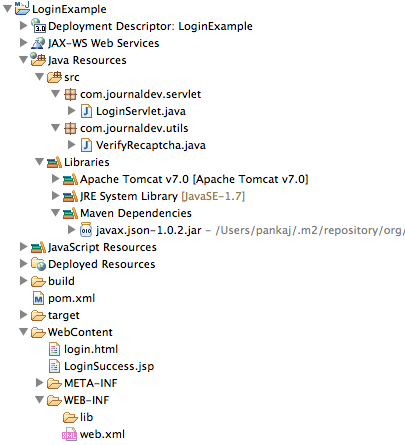 Adding Maven Dependency
To get the project skeleton, just create a “Dynamic Web Project” in Eclipse and then convert it to Maven project. Just add below dependency in pom.xml file for JSON API.
<dependency>
	<groupId>org.glassfish</groupId>
	<artifactId>javax.json</artifactId>
	<version>1.0.2</version>
</dependency>
View Page with Google reCAPTCHA
Below is our login HTML page code.
<!DOCTYPE html>
<html>
<head>
<meta charset="US-ASCII">
<title>Login Page</title>
<script src="https://www.google.com/recaptcha/api.js"></script>
</head>
<body>

	<form action="LoginServlet" method="post">

		Username: <input type="text" name="user"> <br> Password:
		<input type="password" name="pwd"> <br>
		<div
		></div>
		<br> <input type="submit" value="Login">
	</form>
</body>
</html>
We need to add Google reCaptcha JS file in the HTML head section and then add <div></div> in our form to get the reCaptcha widget. That’s all at the client side, it’s really this simple! Once user is validated he will be sent to below success page.
Login Success Page
<%@ page language="java" contentType="text/html; charset=US-ASCII"
    pageEncoding="US-ASCII"%>
<!DOCTYPE html PUBLIC "-//W3C//DTD HTML 4.01 Transitional//EN" "https://www.w3.org/TR/html4/loose.dtd">
<html>
<head>
<meta http-equiv="Content-Type" content="text/html; charset=US-ASCII">
<title>Login Success Page</title>
</head>
<body>
<h3>Hi Name, Login successful.</h3>
<a href="login.html">Login Page</a>
</body>
</html>
Login Servlet
Below is our simple LoginServlet.java servlet code where we are validating username and password fields. For simplicity, they are embedded as WebInitParam in the servlet code itself.
package com.journaldev.servlet;

import java.io.IOException;
import java.io.PrintWriter;
import javax.servlet.RequestDispatcher;
import javax.servlet.ServletException;
import javax.servlet.annotation.WebInitParam;
import javax.servlet.annotation.WebServlet;
import javax.servlet.http.HttpServlet;
import javax.servlet.http.HttpServletRequest;
import javax.servlet.http.HttpServletResponse;
import com.journaldev.utils.VerifyRecaptcha;

@WebServlet(description = "Login Servlet", urlPatterns = { "/LoginServlet" }, initParams = {
    @WebInitParam(name = "user", value = "Name"),
    @WebInitParam(name = "password", value = "journaldev") })
public class LoginServlet extends HttpServlet {

    private static final long serialVersionUID = -6506682026701304964L;

    protected void doPost(HttpServletRequest request, HttpServletResponse response) throws ServletException, IOException {
        String user = request.getParameter("user");
        String pwd = request.getParameter("pwd");
        String gRecaptchaResponse = request.getParameter("g-recaptcha-response");
        boolean verify = VerifyRecaptcha.verify(gRecaptchaResponse);

        String userID = getServletConfig().getInitParameter("user");
        String password = getServletConfig().getInitParameter("password");

        if (userID.equals(user) && password.equals(pwd) && verify) {
            response.sendRedirect("LoginSuccess.jsp");
        } else {
            RequestDispatcher rd = getServletContext().getRequestDispatcher("/login.html");
            PrintWriter out = response.getWriter();
            if (verify) {
                out.println("Either username or password is incorrect.");
            } else {
                out.println("You missed the Captcha.");
            }
            rd.include(request, response);
        }
    }
}
VerifyRecaptcha Utility Class
This utility class handles the verification of the reCAPTCHA response with Google's server.
package com.journaldev.utils;

import java.io.BufferedReader;
import java.io.DataOutputStream;
import java.io.IOException;
import java.io.InputStreamReader;
import java.io.StringReader;
import java.net.URL;
import javax.json.Json;
import javax.json.JsonObject;
import javax.json.JsonReader;
import javax.net.ssl.HttpsURLConnection;

public class VerifyRecaptcha {

    public static final String url = "https://www.google.com/recaptcha/api/siteverify";
    public static final String secret = "6LdMAgMTAAAAAJOAqKgjWe9DUujd2iyTmzjXilM7";
    private final static String USER_AGENT = "Mozilla/5.0";

    public static boolean verify(String gRecaptchaResponse) throws IOException {
        if (gRecaptchaResponse == null || "".equals(gRecaptchaResponse)) {
            return false;
        }

        try {
            URL obj = new URL(url);
            HttpsURLConnection con = (HttpsURLConnection) obj.openConnection();

            con.setRequestMethod("POST");
            con.setRequestProperty("User-Agent", USER_AGENT);
            con.setRequestProperty("Accept-Language", "en-US,en;q=0.5");

            String postParams = "secret=" + secret + "&response=" + gRecaptchaResponse;

            con.setDoOutput(true);
            DataOutputStream wr = new DataOutputStream(con.getOutputStream());
            wr.writeBytes(postParams);
            wr.flush();
            wr.close();

            BufferedReader in = new BufferedReader(new InputStreamReader(con.getInputStream()));
            String inputLine;
            StringBuilder response = new StringBuilder();

            while ((inputLine = in.readLine()) != null) {
                response.append(inputLine);
            }
            in.close();

            JsonReader jsonReader = Json.createReader(new StringReader(response.toString()));
            JsonObject jsonObject = jsonReader.readObject();
            jsonReader.close();

            return jsonObject.getBoolean("success");
        } catch (Exception e) {
            e.printStackTrace();
            return false;
        }
    }
}
Conclusion
That’s all. Our application is ready, and you can now download the project and test the Google reCAPTCHA integration in a Java web application.
Test your setup on ccloud³
Sign up for ccloud³ and receive €200 starting credit for your project.