Praxis
Redis on Ubuntu 22.04: Installation & Security
Redis can improve the performance of your system. We will show you how to configure and back up the in-memory database on…

We’ve all been there: the moment you take your eye off the ball, one wrong tick or an inaccurate click, and your lovingly designed website is gone. Fortunately, in such cases, you can fall back on a hosting backup. To make this process as easy as possible for our customers, our technicians have introduced a new option for integrating external backups.
All centron customers with a Linux hosting or Shopware package use a range of common backup and cloud storage solutions to back up their web projects securely and reliably. The centron Plesk interface currently supports the following technologies:
centron S3 Storage
Amazon S3 Storage
FTP(s)
SFTP
DigitalOcean Spaces
Dropbox
Google Drive
Microsoft OneDrive
Order centron S3 storage (if not already available)
You will need a centron S3 object storage service for the backup. You can order this at https://www.centron.de/enterprise/s3-storage/. After booking, you will receive an email from us containing your access details. Please have these to hand for the next steps.
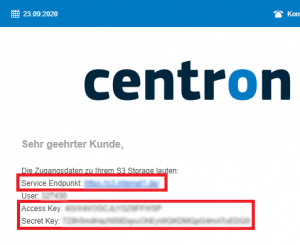
Log in to your Plesk server and select the Backup Manager
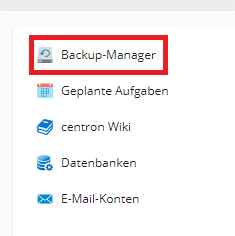
Then select the settings for remote storage.
In the provider selection, click on ‘Amazon S3 Backup’.
no- repeat;left top;;
auto## Set up S3 Storage Backup
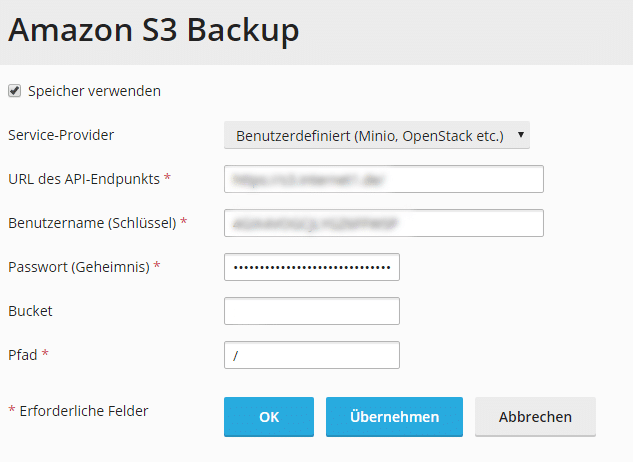
In the next window, select the ‘Custom’ option for Service Provider. For the following fields, you will need the access details we sent you by email:
URL of the API endpoint = service endpoint
Username (key) = access key
Password (Secret) = Secret Key
Bucket = Bucket Name
Path = / (if you have created a subfolder to store your backups, enter it here, e.g.: /backups)
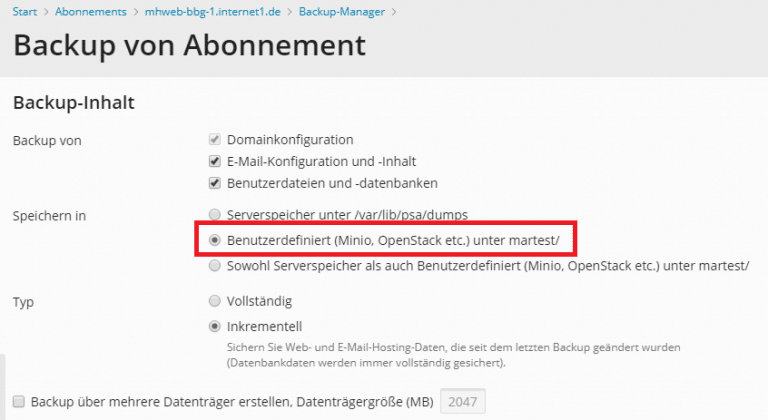
Once you have set up your storage solution, you can use the backup manager to trigger manual hosting backups or to automate this process:


Redis can improve the performance of your system. We will show you how to configure and back up the in-memory database on…

Web server stability and security are critical. We show how web server checkpoints minimize downtime and protect data.

We will show you how to make Nginx, one of the most popular web servers, secure with Let's Encrypt on Ubuntu 22.04.
Sign up and receive €200 credit at centron within your first 60 days.
This promotional offer applies to new accounts only. Available exclusively to businesses.