Ajax in Java JSP Servlet based web applications are very common. Recently I have written a lot about jQuery methods and how we can use them. Today we will look into one of the important jQuery functionality where we can easily execute AJAX calls and process the response in a Java Servlet JSP based web application.
Ajax JSP Servlet Example
I am using Eclipse IDE for creating the “Dynamic Web Project”, you can use any other IDE too. Our main focus will be towards jQuery and AJAX call from JSP to a servlet. Below image shows the final project structure.
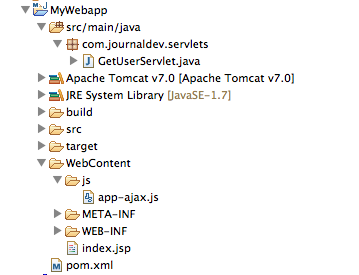
Ajax Servlet Code
We have a very simple servlet that gets the userName from request, create a greetings and return it as plain text.
package com.journaldev.servlets;

import java.io.IOException;
import javax.servlet.ServletException;
import javax.servlet.annotation.WebServlet;
import javax.servlet.http.HttpServlet;
import javax.servlet.http.HttpServletRequest;
import javax.servlet.http.HttpServletResponse;

@WebServlet("/GetUserServlet")
public class GetUserServlet extends HttpServlet {
	private static final long serialVersionUID = 1L;

	protected void doGet(HttpServletRequest request, HttpServletResponse response) throws ServletException, IOException {

		String userName = request.getParameter("userName").trim();
		if(userName == null || "".equals(userName)){
			userName = "Guest";
		}

		String greetings = "Hello " + userName;

		response.setContentType("text/plain");
		response.getWriter().write(greetings);
	}

}
Notice that I am using Servlet-3 annotations for configuration, if you like XML based configuration then you can do it in web.xml file. We will call this servlet asynchronously using jQuery AJAX support.
Ajax JSP Page
Below is our JSP page code, it has an input field where we can provide user name. As soon as focus is moved out of it, jQuery AJAX method will execute and call our servlet and process the response. index.jsp code:
<%@ page language="java" contentType="text/html; charset=UTF-8"
	pageEncoding="UTF-8"%>
<!DOCTYPE html PUBLIC "-//W3C//DTD HTML 4.01 Transitional//EN"
"https://www.w3.org/TR/html4/loose.dtd">
<html>
<head>
<meta http-equiv="Content-Type" content="text/html; charset=UTF-8">
<title>jQuery, Ajax and Servlet/JSP integration example</title>

<script src="https://code.jquery.com/jquery-1.10.2.js"
	type="text/javascript"></script>
<script src="js/app-ajax.js" type="text/javascript"></script>
</head>
<body>

	<form>
		Enter Your Name: <input type="text" />
	</form>
	<br>
	<br>

	<strong>Ajax Response</strong>:
	<div></div>
</body>
</html>
Notice that we have two JS files included in the JSP page, first one is the jQuery JS library and another one contains our JS code for ajax call. I am including jQuery JS from the code.jquery.com URL, we can also download it and keep with our JS file. JSP code is very simple, we will populate ajaxGetUserServletResponse div content from the AJAX call response through jQuery.
jQuery AJAX JavaScript File
Below is our javascript file code for jQuery AJAX request. app-ajax.js code:
$(document).ready(function() {
        $('#userName').blur(function(event) {
                var name = $('#userName').val();
                $.get('GetUserServlet', {
                        userName : name
                }, function(responseText) {
                        $('#ajaxGetUserServletResponse').text(responseText);
                });
        });
});
We can also make jQuery AJAX call using it’s ajax() method, as shown below. Above is the shorthand approach to using ajax() method.
$(document).ready(function() {
	$('#userName').blur(function() {
		$.ajax({
			url : 'GetUserServlet',
			data : {
				userName : $('#userName').val()
			},
			success : function(responseText) {
				$('#ajaxGetUserServletResponse').text(responseText);
			}
		});
	});
});
Below is the syntax of the jQuery ajax() method, try to relate it to the above code and you will understand what’s going on here.
$.ajax({
  url: url,
  data: data,
  success: success,
  dataType: dataType
});
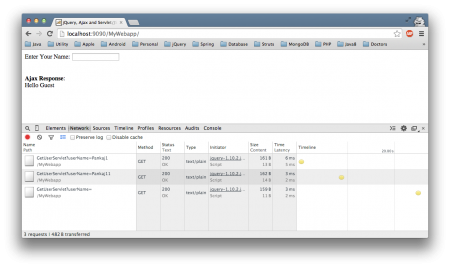
Our jQuery Ajax JSP Servlet Example application is ready, just build and deploy it in your favorite servlet container. Below image shows the output produced, I am using Chrome Developer tools to confirm that our servlet is getting called.
Matching infrastructure at centron
Node applications need somewhere to run: ccloud³ VMs with full root access from €3.11 per month – or as a managed server if you would rather not run it yourself. Rent a cloud server →
Ajax JSP Servlet Example Summary
We learned the basics of jQuery AJAX support and how we can integrate it with Java web application, in next tutorials we will learn more features of jQuery that we can use in any web application.
Test your setup on ccloud³
Sign up for ccloud³ and receive €200 starting credit for your project.