When exiting the shell of a Linux System, all running processes are usually terminated or hang up. So what do you do If you still want to keep the processes running even exiting the shell/terminal? This is where the nohup command comes in.
Nohup Command
Nohup, short for no hang up is a command in Linux systems that keep processes running even after exiting the shell or terminal. Nohup prevents the processes or jobs from receiving the SIGHUP (Signal Hang UP) signal. This is a signal that is sent to a process upon closing or exiting the terminal. In this guide, we take a look at the nohup command and demonstrate how it can be used.
Matching infrastructure at centron
No hardware needed to follow along: ccloud³ VMs with full root access start at €3.11 per month, billed by the hour and ready in seconds. Rent a cloud server →
Nohup Command Syntax
Nohup command syntax is as follows;
nohup command argumentsOR
nohup optionsLet’s see how the command comes into play
Checking the version of Nohup
You can begin by checking the version of Nohup using the syntax below
nohup --versionOutput

Starting a process using Nohup
If you want to keep your processes/jobs running, precede the command with nohup as shown below. The jobs will still continue running in the shell and will not get killed upon exiting the shell or terminal.
nohup ./hello.shOutput

From the output above, the output of the command has been saved to nohup.out to verify this run,
cat nohup.outOutput

Additionally, you can opt to redirect the output to a different file as shown
nohup ./hello.sh > output.txtOnce again, to view the file run
cat output.txtOutput

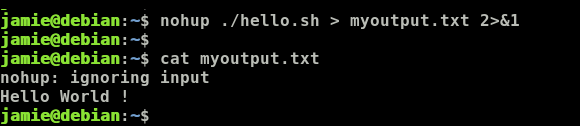
To redirect to a file and to standard error and output use the > filename 2>&1 attribute as shown
nohup ./hello.sh > myoutput.txt 2>&1Output
Starting a process in the background using Nohup
To start a process in the background use the & symbol at the end of the command. In this example, we are pinging google.com and sending it to the background.
nohup ping google.com &Output

To check the process when resuming the shell use the pgrep command as shown
pgrep -a pingOutput

If you want to stop or kill the running process, use the kill command followed by the process ID as shown
kill 2565Output

Summary
- All processes that are run using the nohup command will ignore the SIGHUP signal even upon exiting the shell.
- Once a job is started or executed using the nohup command, stdin will not be available to the user.
- By default, the nohup.out is used as the default file for stdout and stderr.
Test your setup on ccloud³
Sign up for ccloud³ and receive €200 starting credit for your project.