Spring Boot is the easiest way to spin a spring project quickly and MongoDB is the most popular NoSQL database. Let’s see how to integrate spring with MongoDB database.
Spring Boot MongoDB
We need following APIs to work with Spring Boot and MongoDB database.
- Spring Data MongoDB
- Spring Boot
There are two approaches through which we can connect to MongoDB database - MongoRepository and MongoTemplate. We will try to establish what one API offers over another and when should you choose any one of them for your use-case. We will make use of Spring Initializr tool for quickly setting up the project. So, let’s get started.
Spring Boot MongoDB Project Setup
We will make use of Spring Initializr tool for quickly setting up the project. We will use just two dependencies as shown below:
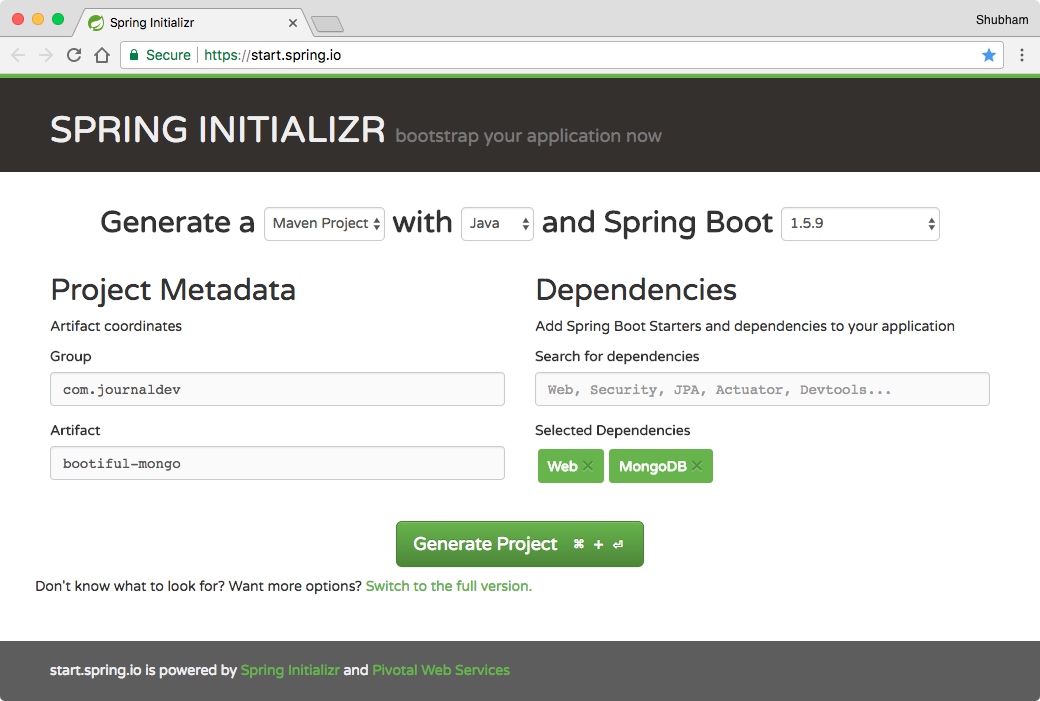
Download the project and unzip it. Then import it into your favorite IDE - Eclipse or IntelliJ IDEA.
Maven Dependencies
Though we already completed the setup with the tool, if you want to set it up manually, we use Maven build system for this project and here are the dependencies we used:
<?xml version="1.0" encoding="UTF-8"?>
<project xmlns="https://maven.apache.org/POM/4.0.0" xmlns:xsi="https://www.w3.org/2001/XMLSchema-instance"
	xsi:schemaLocation="https://maven.apache.org/POM/4.0.0 https://maven.apache.org/xsd/maven-4.0.0.xsd">
	<modelVersion>4.0.0</modelVersion>

	<groupId>com.journaldev.spring</groupId>
	<artifactId>spring-boot-mongodb</artifactId>
	<version>0.0.1-SNAPSHOT</version>
	<packaging>jar</packaging>

	<name>spring-boot-mongodb</name>
	<description>Spring Boot MongoDB Example</description>

	<parent>
		<groupId>org.springframework.boot</groupId>
		<artifactId>spring-boot-starter-parent</artifactId>
		<version>1.5.9.RELEASE</version>
		<relativePath /> <!-- lookup parent from repository -->
	</parent>

	<properties>
		<project.build.sourceEncoding>UTF-8</project.build.sourceEncoding>
		<project.reporting.outputEncoding>UTF-8</project.reporting.outputEncoding>
		<java.version>1.8</java.version>
	</properties>

	<dependencies>
		<dependency>
			<groupId>org.springframework.boot</groupId>
			<artifactId>spring-boot-starter-data-mongodb</artifactId>
		</dependency>
		<dependency>
			<groupId>org.springframework.boot</groupId>
			<artifactId>spring-boot-starter-web</artifactId>
		</dependency>

		<dependency>
			<groupId>org.springframework.boot</groupId>
			<artifactId>spring-boot-starter-test</artifactId>
			<scope>test</scope>
		</dependency>
	</dependencies>

	<build>
		<plugins>
			<plugin>
				<groupId>org.springframework.boot</groupId>
				<artifactId>spring-boot-maven-plugin</artifactId>
			</plugin>
		</plugins>
	</build>
</project>
Make sure to use stable version for Spring Boot from the maven central.
Spring Boot MongoDB Model Class
We have a simple model class User.java.
package com.journaldev.bootifulmongodb.model;

import java.util.Date;
import java.util.HashMap;
import java.util.Map;

import org.springframework.data.annotation.Id;
import org.springframework.data.mongodb.core.mapping.Document;

@Document
public class User {

	@Id
	private String userId;
	private String name;
	private Date creationDate = new Date();
	private Map<String, String> userSettings = new HashMap<>();

	public String getUserId() {
		return userId;
	}

	public void setUserId(String userId) {
		this.userId = userId;
	}

	public String getName() {
		return name;
	}

	public void setName(String name) {
		this.name = name;
	}

	public Date getCreationDate() {
		return creationDate;
	}

	public void setCreationDate(Date creationDate) {
		this.creationDate = creationDate;
	}

	public Map<String, String> getUserSettings() {
		return userSettings;
	}

	public void setUserSettings(Map<String, String> userSettings) {
		this.userSettings = userSettings;
	}
}
Spring Boot MongoDB APIs
We will have the following functionalities and Database interactions in our app:
- Get all users
- Get a user with ID
- Get user settings
- Get a particular key from the Map
- Add/Update user setting
Spring Data MongoDB - MongoRepository
Now we will use Spring Data MongoDB repository to access our data. Spring Data MongoRepository provides us with common functionalities that we can easily plug in and use. Let us define our Repository interface:
package com.journaldev.bootifulmongodb.dal;

import org.springframework.data.mongodb.repository.MongoRepository;
import org.springframework.stereotype.Repository;

import com.journaldev.bootifulmongodb.model.User;

@Repository
public interface UserRepository extends MongoRepository<User, String> {
}
Defining MongoDB properties
Before we lay out our controller, it is important that we make a connection with a local instance of MongoDB. We will use Spring Boot properties to do this:
#Local MongoDB config
spring.data.mongodb.authentication-database=admin
spring.data.mongodb.username=root
spring.data.mongodb.password=root
spring.data.mongodb.database=user_db
spring.data.mongodb.port=27017
spring.data.mongodb.host=localhost

# App config
server.port=8102
spring.application.name=BootMongo
server.context-path=/user
Defining the Spring Controller
Let us finally move to making our Controller class:
package com.journaldev.bootifulmongodb.controller;

import java.util.List;

import org.slf4j.Logger;
import org.slf4j.LoggerFactory;
import org.springframework.web.bind.annotation.PathVariable;
import org.springframework.web.bind.annotation.RequestBody;
import org.springframework.web.bind.annotation.RequestMapping;
import org.springframework.web.bind.annotation.RequestMethod;
import org.springframework.web.bind.annotation.RestController;

import com.journaldev.bootifulmongodb.dal.UserRepository;
import com.journaldev.bootifulmongodb.model.User;

@RestController
@RequestMapping(value = "/")
public class UserController {

    private final Logger LOG = LoggerFactory.getLogger(getClass());

    private final UserRepository userRepository;

    public UserController(UserRepository userRepository) {
        this.userRepository = userRepository;
    }
}
Defining the APIs
For the functionalities we mentioned, we will now be making APIs and accessing the userRepository dependency which will internally use Spring Data MongoRepository API. Notice that we do not have to write any database interaction code in the interface as Spring Data does it all for us.
Getting all users:
@RequestMapping(value = "", method = RequestMethod.GET)
public List getAllUsers() {
    LOG.info("Getting all users.");
    return userRepository.findAll();
}
findAll() is just a method which Spring Data MongoRepository provides internally.
Getting a user by ID:
@RequestMapping(value = "/{userId}", method = RequestMethod.GET)
public User getUser(@PathVariable String userId) {
    LOG.info("Getting user with ID: {}.", userId);
    return userRepository.findOne(userId);
}
findOne() is just a method which Spring Data MongoRepository provides internally to get an Object by an ID.
Adding a new User:
@RequestMapping(value = "/create", method = RequestMethod.POST)
public User addNewUsers(@RequestBody User user) {
    LOG.info("Saving user.");
    return userRepository.save(user);
}
Getting User settings:
@RequestMapping(value = "/settings/{userId}", method = RequestMethod.GET)
public Object getAllUserSettings(@PathVariable String userId) {
    User user = userRepository.findOne(userId);
    if (user != null) {
        return user.getUserSettings();
    } else {
        return "User not found.";
    }
}
Getting a particular User setting:
@RequestMapping(value = "/settings/{userId}/{key}", method = RequestMethod.GET)
public String getUserSetting(@PathVariable String userId, @PathVariable String key) {
    User user = userRepository.findOne(userId);
    if (user != null) {
        return user.getUserSettings().get(key);
    } else {
        return "User not found.";
    }
}
Adding a new User setting:
@RequestMapping(value = "/settings/{userId}/{key}/{value}", method = RequestMethod.GET)
public String addUserSetting(@PathVariable String userId, @PathVariable String key, @PathVariable String value) {
    User user = userRepository.findOne(userId);
    if (user != null) {
        user.getUserSettings().put(key, value);
        userRepository.save(user);
        return "Key added";
    } else {
        return "User not found.";
    }
}
Spring Data MongoDB - MongoTemplate
We will be defining the MongoTemplate database queries here. With MongoTemplate, you will see that we have much more granular control over what we query and what data is included in the results.
Defining the DAL interface
To provide a contract at the database access layer, we will start by defining an interface which works just like our Spring Data in-built methods:
package com.journaldev.bootifulmongodb.dal;

import java.util.List;

import com.journaldev.bootifulmongodb.model.User;

public interface UserDAL {

    List getAllUsers();

    User getUserById(String userId);

    User addNewUser(User user);

    Object getAllUserSettings(String userId);

    String getUserSetting(String userId, String key);

    String addUserSetting(String userId, String key, String value);
}
Implementing the DAL interface
Let’s move on and define these methods:
package com.journaldev.bootifulmongodb.dal;

import java.util.List;

import org.springframework.beans.factory.annotation.Autowired;
import org.springframework.data.mongodb.core.MongoTemplate;
import org.springframework.data.mongodb.core.query.Criteria;
import org.springframework.data.mongodb.core.query.Query;
import org.springframework.stereotype.Repository;

import com.journaldev.bootifulmongodb.model.User;

@Repository
public class UserDALImpl implements UserDAL {

	@Autowired
	private MongoTemplate mongoTemplate;

	@Override
	public List getAllUsers() {
		return mongoTemplate.findAll(User.class);
	}

	@Override
	public User getUserById(String userId) {
		Query query = new Query();
		query.addCriteria(Criteria.where("userId").is(userId));
		return mongoTemplate.findOne(query, User.class);
	}

	@Override
	public User addNewUser(User user) {
		mongoTemplate.save(user);
		// Now, user object will contain the ID as well
		return user;
	}

	@Override
	public Object getAllUserSettings(String userId) {
		Query query = new Query();
		query.addCriteria(Criteria.where("userId").is(userId));
		User user = mongoTemplate.findOne(query, User.class);
		return user != null ? user.getUserSettings() : "User not found.";
	}

	@Override
	public String getUserSetting(String userId, String key) {
		Query query = new Query();
		query.fields().include("userSettings");
		query.addCriteria(Criteria.where("userId").is(userId).andOperator(Criteria.where("userSettings." + key).exists(true)));
		User user = mongoTemplate.findOne(query, User.class);
		return user != null ? user.getUserSettings().get(key) : "Not found.";
	}

	@Override
	public String addUserSetting(String userId, String key, String value) {
		Query query = new Query();
		query.addCriteria(Criteria.where("userId").is(userId));
		User user = mongoTemplate.findOne(query, User.class);
		if (user != null) {
			user.getUserSettings().put(key, value);
			mongoTemplate.save(user);
			return "Key added.";
		} else {
			return "User not found.";
		}
	}
}
The method implementations in the above class are using MongoTemplate dependency. We constructed queries with criteria to check equality. Also, we queried upon both user and the map key.
Spring Data MongoDB Test Run
We can run this app simply by using a single command:
mvn spring-boot:runOnce the app is running, we can try saving a new user by using this API:
https://localhost:8102/user/createAs this will be a POST request, we will be sending JSON data as well:
{
  "name" : "Shubham",
  "userSettings" : {
    "bike" : "pulsar"
  }
}
As we are returning the Mongo response itself, we will get something like:
{
  "userId": "5a5f28cc3178058b0fafe1dd",
  "name": "Shubham",
  "creationDate": 1516165830856,
  "userSettings": {
    "bike" : "pulsar"
  }
}
Spring Data MongoDB MongoRepository Example CreateYou can get all users by using the API as a GET request:
https://localhost:8102/user/We will get back something like:
[
  {
    "userId": "5a5f28cc3178058b0fafe1dd",
    "name": "Shubham",
    "creationDate": 1516165830856,
    "userSettings": {
      "bike" : "pulsar"
    }
  }
]
If you see above UserController class, we haven’t hooked up MongoTemplate to be used. Below code snippet shows the changes required to use MongoTemplate for reading user settings.
//define Data Access Layer object
private final UserDAL userDAL;

//initialize DAL object via constructor autowiring
public UserController(UserRepository userRepository, UserDAL userDAL) {
	this.userRepository = userRepository;
	this.userDAL = userDAL;
}

//change method implementation to use DAL and hence MongoTemplate
@RequestMapping(value = "/settings/{userId}", method = RequestMethod.GET)
public Object getAllUserSettings(@PathVariable String userId) {
    User user = userRepository.findOne(userId);
    if (user != null) {
        return userDAL.getAllUserSettings(userId);
    } else {
        return "User not found.";
    }
}

//change method implementation to use DAL and hence MongoTemplate
@RequestMapping(value = "/settings/{userId}/{key}", method = RequestMethod.GET)
public String getUserSetting(
        @PathVariable String userId, @PathVariable String key) {
    return userDAL.getUserSetting(userId, key);
}
MongoTemplate vs MongoRepository
MongoTemplate provides a lot more control when it comes to querying data and what data to pull from the database.
Spring Data repositories provide us a convenient outlook on how to fetch data.
MongoTemplate is database dependent. What this means is, with Spring Data repositories, you can easily switch to a different database altogether by simply using a different Spring Data repositories for MySQL or Neo4J or anything else. This is not possible with MongoTemplate.
Matching infrastructure at centron
No hardware needed to follow along: ccloud³ VMs with full root access start at €3.11 per month, billed by the hour and ready in seconds. Rent a cloud server →
Spring Boot MongoDB Summary
In this Guide, we looked at how MongoTemplate can provide us more control over Spring Data repositories but can also be a little complicated when deeper queries are involved. So, this is completely your call what to choose when you develop your idea. Feel free to leave comments below. Download the source code from below link. Please make sure that you change the MongoDB credentials before running the provided app. Welcome
Test your setup on ccloud³
Sign up for ccloud³ and receive €200 starting credit for your project.