Sometime back I wrote an article about Spring REST JSON and I got a lot of comments asking how to change the program to support XML. I got some emails also asking how to make application supports both XML as well as JSON.
Spring REST XML and JSON
Now do following changes to spring bean configuration file.
1. Define a Bean of Type Jaxb2RootElementHttpMessageConverter
<beans:bean>
</beans:bean>
2. Add Configured Bean to RequestMappingHandlerAdapter
<beans:bean>
<beans:property name="messageConverters">
    <beans:list>
        <beans:ref bean="jsonMessageConverter"/>
        <beans:ref bean="xmlMessageConverter"/>
    </beans:list>
</beans:property>
</beans:bean>
After above changes, our final spring bean configuration file will look like below. servlet-context.xml
<?xml version="1.0" encoding="UTF-8"?>
<beans:beans xmlns="https://www.springframework.org/schema/mvc"
    xmlns:xsi="https://www.w3.org/2001/XMLSchema-instance"
    xmlns:beans="https://www.springframework.org/schema/beans"
    xmlns:context="https://www.springframework.org/schema/context"
    xsi:schemaLocation="https://www.springframework.org/schema/mvc https://www.springframework.org/schema/mvc/spring-mvc.xsd
        https://www.springframework.org/schema/beans https://www.springframework.org/schema/beans/spring-beans.xsd
        https://www.springframework.org/schema/context https://www.springframework.org/schema/context/spring-context.xsd">

    <!-- DispatcherServlet Context: defines this servlet's request-processing infrastructure -->
    <!-- Enables the Spring MVC @Controller programming model -->
    <annotation-driven />
    <!-- Handles HTTP GET requests for /resources/** by efficiently serving up static resources in the ${webappRoot}/resources directory -->
    <resources mapping="/resources/**" location="/resources/" />
    <!-- Resolves views selected for rendering by @Controllers to .jsp resources in the /WEB-INF/views directory -->
    <beans:bean>
        <beans:property name="prefix" value="/WEB-INF/views/" />
        <beans:property name="suffix" value=".jsp" />
    </beans:bean>
    <!-- Configure to plugin JSON as request and response in method handler -->
    <beans:bean>
        <beans:property name="messageConverters">
            <beans:list>
                <beans:ref bean="jsonMessageConverter"/>
                <beans:ref bean="xmlMessageConverter"/>
            </beans:list>
        </beans:property>
    </beans:bean>
    <!-- Configure bean to convert JSON to POJO and vice versa -->
    <beans:bean>
    </beans:bean>
    <beans:bean>
    </beans:bean>
    <context:component-scan base-package="com.journaldev.spring.controller" />
</beans:beans>
We know that for working with JAXB marshalling for a class, we need to annotate it with @XmlRootElement annotation. So add this to our Employee model class. Employee.java
@XmlRootElement
public class Employee implements Serializable{
//no change in code
}
That’s it, we are DONE. Our Spring application will support both JSON as well as XML. It will even support XML request with JSON response and vice versa. Below are some of the screenshots showing this in action. NOTE: I am using Postman Chrome application for this, you can use any rest client for this testing.
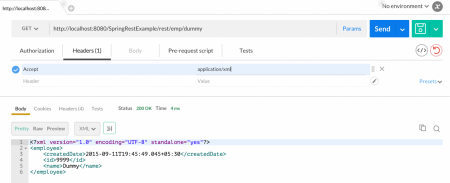
1. Spring REST XML Response
Make sure you pass Accept header as “application/xml”.
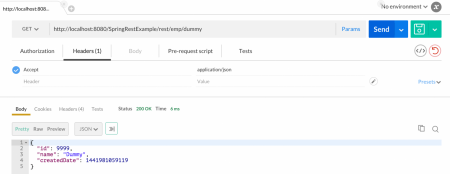
2. Spring REST JSON Response
Make sure you pass Accept header as “application/json”.
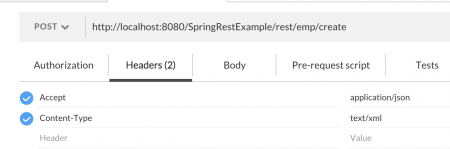
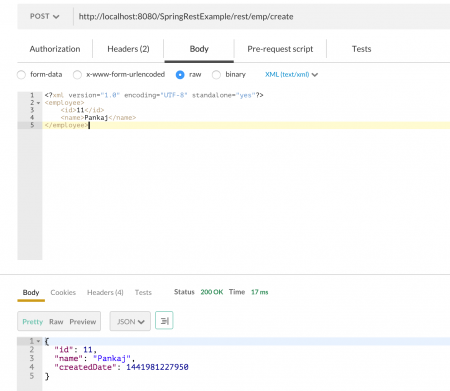
3. XML Request with JSON Response
Make sure Accept header is “application/json” and Content-Type header is “text/xml” as shown in below images.
Matching infrastructure at centron
Node applications need somewhere to run: ccloud³ VMs with full root access from €3.11 per month – or as a managed server if you would rather not run it yourself. Rent a cloud server →
Conclusion
That’s all for Spring Restful web services example for supporting both XML and JSON. You can see how easy it is to extend Spring framework, this is one of the major reason of spring framework popularity.
Test your setup on ccloud³
Sign up for ccloud³ and receive €200 starting credit for your project.