Sometime back I was looking for a way to search Google using Java Program. I was surprised to see that Google had a web search API but it has been deprecated long back and now there is no standard way to achieve this. Basically google search is an HTTP GET request where query parameter is part of the URL, and earlier we have seen that there are different options such as Java HttpUrlConnection or Apache HttpClient to perform this search. But the problem is more related to parsing the HTML response and get the useful information out of it. That’s why I chose to use jsoup that is an open source HTML parser and it’s capable to fetch HTML from given URL. So below is a simple program to fetch google search results in a java program and then parse it to find out the search results.
Java Code for Google Search
Below is the Java program to fetch Google search results using jsoup:
package com.journaldev.jsoup;

import java.io.IOException;
import java.util.Scanner;

import org.jsoup.Jsoup;
import org.jsoup.nodes.Document;
import org.jsoup.nodes.Element;
import org.jsoup.select.Elements;

public class GoogleSearchJava {

    public static final String GOOGLE_SEARCH_URL = "https://www.google.com/search";
    public static void main(String[] args) throws IOException {
        //Taking search term input from console
        Scanner scanner = new Scanner(System.in);
        System.out.println("Please enter the search term.");
        String searchTerm = scanner.nextLine();
        System.out.println("Please enter the number of results. Example: 5 10 20");
        int num = scanner.nextInt();
        scanner.close();

        String searchURL = GOOGLE_SEARCH_URL + "?q="+searchTerm+"&num="+num;
        //without proper User-Agent, we will get 403 error
        Document doc = Jsoup.connect(searchURL).userAgent("Mozilla/5.0").get();

        //below will print HTML data, save it to a file and open in browser to compare
        //System.out.println(doc.html());

		//If google search results HTML change the <h3 to <h3
		//we need to change below accordingly
		Elements results = doc.select("h3.r > a");

		for (Element result : results) {
			String linkHref = result.attr("href");
			String linkText = result.text();
			System.out.println("Text::" + linkText + ", URL::" + linkHref.substring(6, linkHref.indexOf("&")));
		}
	}

}Matching infrastructure at centron
Node applications need somewhere to run: ccloud³ VMs with full root access from €3.11 per month – or as a managed server if you would rather not run it yourself. Rent a cloud server →
Sample Output
Below is a sample output from the above program. I saved the HTML data into a file and opened it in a browser to confirm the output:
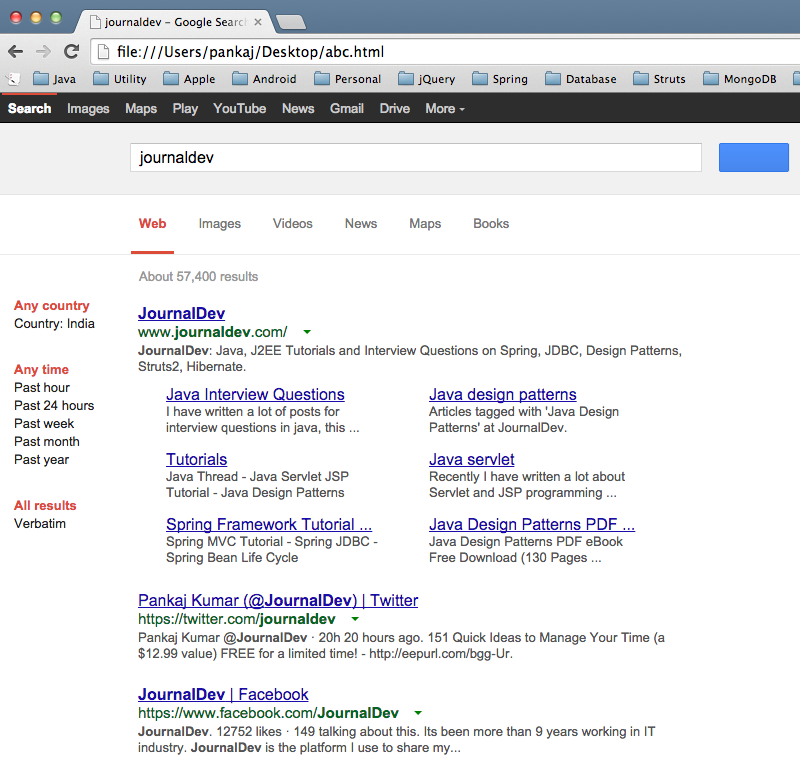
Please enter the search term.
journaldev
Please enter the number of results. Example: 5 10 20
20
Text::JournalDev, URL::=https://www.journaldev.com/
Text::Java Interview Questions, URL::=https://www.journaldev.com/java-interview-questions
Text::Java design patterns, URL::=https://www.journaldev.com/tag/java-design-patterns
Text::Tutorials, URL::=https://www.journaldev.com/tutorials
Text::Java servlet, URL::=https://www.journaldev.com/tag/java-servlet
Text::Spring Framework Tutorial ..., URL::=https://www.journaldev.com/2888/spring-tutorial-spring-core-tutorial
Text::Java Design Patterns PDF ..., URL::=https://www.journaldev.com/6308/java-design-patterns-pdf-ebook-free-download-130-pages
Text::Pankaj Kumar (@JournalDev) | Twitter, URL::=https://twitter.com/journaldev
Text::JournalDev | Facebook, URL::=https://www.facebook.com/JournalDev
Text::JournalDev - Chrome Web Store - Google, URL::=https://chrome.google.com/webstore/detail/journaldev/ckdhakodkbphniaehlpackbmhbgfmekf
Text::Debian -- Details of package libsystemd-journal-dev in wheezy, URL::=https://packages.debian.org/wheezy/libsystemd-journal-dev
Text::Debian -- Details of package libsystemd-journal-dev in wheezy ..., URL::=https://packages.debian.org/wheezy-backports/libsystemd-journal-dev
Text::Debian -- Details of package libsystemd-journal-dev in sid, URL::=https://packages.debian.org/sid/libsystemd-journal-dev
Text::Debian -- Details of package libsystemd-journal-dev in jessie, URL::=https://packages.debian.org/jessie/libsystemd-journal-dev
Text::Ubuntu – Details of package libsystemd-journal-dev in trusty, URL::=https://packages.ubuntu.com/trusty/libsystemd-journal-dev
Text::libsystemd-journal-dev : Utopic (14.10) : Ubuntu - Launchpad, URL::=https://launchpad.net/ubuntu/utopic/%2Bpackage/libsystemd-journal-dev
Text::Debian -- Details of package libghc-libsystemd-journal-dev in jessie, URL::=https://packages.debian.org/jessie/libghc-libsystemd-journal-dev
Text::Advertise on JournalDev | BuySellAds, URL::=https://buysellads.com/buy/detail/231824
Text::JournalDev | LinkedIn, URL::=https://www.linkedin.com/groups/JournalDev-6748558
Text::How to install libsystemd-journal-dev package in Ubuntu Trusty, URL::=https://www.howtoinstall.co/en/ubuntu/trusty/main/libsystemd-journal-dev/
Text::[global] auth supported = cephx ms bind ipv6 = true [mon] mon data ..., URL::=https://zooi.widodh.nl/ceph/ceph.conf
Text::UbuntuUpdates - Package "libsystemd-journal-dev" (trusty 14.04), URL::=https://www.ubuntuupdates.org/libsystemd-journal-dev
Text::[Journal]Dev'err - Cursus Honorum - Enjin, URL::=https://cursushonorum.enjin.com/holonet/m/23958869/viewthread/13220130-journaldeverr/post/last
Conclusion
That’s all for Google search in a Java program. Use it cautiously, as unusual traffic from your computer could lead to Google blocking you. Ensure compliance with Google’s policies and be mindful that parsing HTML can be fragile if the page structure changes. Libraries like jsoup offer an efficient way to fetch and parse data, but always use such tools responsibly and ethically.
Test your setup on ccloud³
Sign up for ccloud³ and receive €200 starting credit for your project.