Welcome to the Spring Internationalization (i18n) Tutorial. Any web application with users all around the world, Spring MVC Internationalization (i18n) or Spring MVC Localization (L10n) is very important for better user interaction. Most of the web application frameworks provide easy ways to localize the application based on user locale settings. Spring also follows the pattern and provides extensive support for internationalization (i18n) through the use of Spring interceptors, Locale Resolvers and Resource Bundles for different locales.
Spring Internationalization i18n
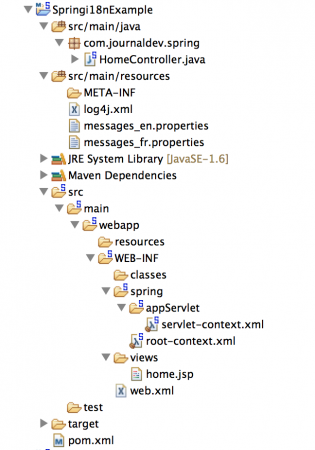
Let’s create a simple Spring MVC project where we will use request parameter to get the user locale and based on that set the response page label values from locale specific resource bundles. Create a Spring MVC Project in the Spring Tool Suite to have the base code for our application.
Matching infrastructure at centron
Node applications need somewhere to run: ccloud³ VMs with full root access from €3.11 per month – or as a managed server if you would rather not run it yourself. Rent a cloud server →
Spring i18n Maven Configuration
Our Spring MVC pom.xml looks like below.
<?xml version="1.0" encoding="UTF-8"?>
<project xmlns="https://maven.apache.org/POM/4.0.0" xmlns:xsi="https://www.w3.org/2001/XMLSchema-instance"
    xsi:schemaLocation="https://maven.apache.org/POM/4.0.0 https://maven.apache.org/maven-v4_0_0.xsd">
    <modelVersion>4.0.0</modelVersion>
    <groupId>com.journaldev</groupId>
    <artifactId>spring</artifactId>
    <name>Springi18nExample</name>
    <packaging>war</packaging>
    <version>1.0.0-BUILD-SNAPSHOT</version>
    <properties>
        <java-version>1.6</java-version>
        <org.springframework-version>4.0.2.RELEASE</org.springframework-version>
        <org.aspectj-version>1.7.4</org.aspectj-version>
        <org.slf4j-version>1.7.5</org.slf4j-version>
    </properties>
    <dependencies>
        <!-- Spring -->
        <dependency>
            <groupId>org.springframework</groupId>
            <artifactId>spring-context</artifactId>
            <version>${org.springframework-version}</version>
            <exclusions>
                <!-- Exclude Commons Logging in favor of SLF4j -->
                <exclusion>
                    <groupId>commons-logging</groupId>
                    <artifactId>commons-logging</artifactId>
                 </exclusion>
            </exclusions>
        </dependency>
        <dependency>
            <groupId>org.springframework</groupId>
            <artifactId>spring-webmvc</artifactId>
            <version>${org.springframework-version}</version>
        </dependency>

        <!-- AspectJ -->
        <dependency>
            <groupId>org.aspectj</groupId>
            <artifactId>aspectjrt</artifactId>
            <version>${org.aspectj-version}</version>
        </dependency>

        <!-- Logging -->
        <dependency>
            <groupId>org.slf4j</groupId>
            <artifactId>slf4j-api</artifactId>
            <version>${org.slf4j-version}</version>
        </dependency>
        <dependency>
            <groupId>org.slf4j</groupId>
            <artifactId>jcl-over-slf4j</artifactId>
            <version>${org.slf4j-version}</version>
            <scope>runtime</scope>
        </dependency>
        <dependency>
            <groupId>org.slf4j</groupId>
            <artifactId>slf4j-log4j12</artifactId>
            <version>${org.slf4j-version}</version>
            <scope>runtime</scope>
        </dependency>
        <dependency>
            <groupId>log4j</groupId>
            <artifactId>log4j</artifactId>
            <version>1.2.15</version>
            <exclusions>
                <exclusion>
                    <groupId>javax.mail</groupId>
                    <artifactId>mail</artifactId>
                </exclusion>
                <exclusion>
                    <groupId>javax.jms</groupId>
                    <artifactId>jms</artifactId>
                </exclusion>
                <exclusion>
                    <groupId>com.sun.jdmk</groupId>
                    <artifactId>jmxtools</artifactId>
                </exclusion>
                <exclusion>
                    <groupId>com.sun.jmx</groupId>
                    <artifactId>jmxri</artifactId>
                </exclusion>
            </exclusions>
            <scope>runtime</scope>
        </dependency>

        <!-- @Inject -->
        <dependency>
            <groupId>javax.inject</groupId>
            <artifactId>javax.inject</artifactId>
            <version>1</version>
        </dependency>

        <!-- Servlet -->
        <dependency>
            <groupId>javax.servlet</groupId>
            <artifactId>servlet-api</artifactId>
            <version>2.5</version>
            <scope>provided</scope>
        </dependency>
        <dependency>
            <groupId>javax.servlet.jsp</groupId>
            <artifactId>jsp-api</artifactId>
            <version>2.1</version>
            <scope>provided</scope>
        </dependency>
        <dependency>
            <groupId>javax.servlet</groupId>
            <artifactId>jstl</artifactId>
            <version>1.2</version>
        </dependency>

        <!-- Test -->
        <dependency>
            <groupId>junit</groupId>
            <artifactId>junit</artifactId>
            <version>4.7</version>
            <scope>test</scope>
        </dependency>
    </dependencies>
    <build>
        <plugins>
            <plugin>
                <artifactId>maven-eclipse-plugin</artifactId>
                <version>2.9</version>
                <configuration>
                    <additionalProjectnatures>
                        <projectnature>org.springframework.ide.eclipse.core.springnature</projectnature>
                    </additionalProjectnatures>
                    <additionalBuildcommands>
                        <buildcommand>org.springframework.ide.eclipse.core.springbuilder</buildcommand>
                    </additionalBuildcommands>
                    <downloadSources>true</downloadSources>
                    <downloadJavadocs>true</downloadJavadocs>
                </configuration>
            </plugin>
            <plugin>
                <groupId>org.apache.maven.plugins</groupId>
                <artifactId>maven-compiler-plugin</artifactId>
                <version>2.5.1</version>
                <configuration>
                    <source>1.6</source>
                    <target>1.6</target>
                    <compilerArgument>-Xlint:all</compilerArgument>
                    <showWarnings>true</showWarnings>
                    <showDeprecation>true</showDeprecation>
                </configuration>
            </plugin>
            <plugin>
                <groupId>org.codehaus.mojo</groupId>
                <artifactId>exec-maven-plugin</artifactId>
                <version>1.2.1</version>
                <configuration>
                    <mainClass>org.test.int1.Main</mainClass>
                </configuration>
            </plugin>
        </plugins>
    </build>
</project>
Spring Resource Bundle
For simplicity, let’s assume that our application supports only two locales - en and fr. If no user locale is specified, we will use English as the default locale. Let’s create spring resource bundles for both these locales that will be used in the JSP page.
messages_en.properties code:
label.title=Login Page
label.firstName=First Name
label.lastName=Last Name
label.submit=Login
messages_fr.properties code:
label.title=Connectez-vous page
label.firstName=Pr\u00E9nom
label.lastName=Nom
label.submit=Connexion
Note that I am using unicode for special characters in the French locale resource bundles, so that it gets interpreted properly in the response HTML sent to client requests. Another important point to note is that both the resource bundles are in the classpath of the application and their name has a pattern as “messages_{locale}.properties”. We will see why these are important later on.
Spring MVC Internationalization i18n - Controller Class
Our controller class is very simple, it just logs the user locale and returns the home.jsp page as response.
package com.journaldev.spring;

import java.util.Locale;

import org.slf4j.Logger;
import org.slf4j.LoggerFactory;
import org.springframework.stereotype.Controller;
import org.springframework.ui.Model;
import org.springframework.web.bind.annotation.RequestMapping;
import org.springframework.web.bind.annotation.RequestMethod;

/**
 * Handles requests for the application home page.
 */
@Controller
public class HomeController {

    private static final Logger logger = LoggerFactory.getLogger(HomeController.class);

    /**
     * Simply selects the home view to render by returning its name.
     */
    @RequestMapping(value = "/", method = RequestMethod.GET)
    public String home(Locale locale, Model model) {
        logger.info("Welcome home! The client locale is {}.", locale);

        return "home";
    }

}
Spring MVC Internationalization i18n JSP Page
Our home.jsp page code looks like below.
<%@taglib uri="https://www.springframework.org/tags" prefix="spring"%>
<%@ page session="false"%>
<html>
<head>
<title><spring:message code="label.title" /></title>
</head>
<body>
    <form method="post" action="login">
        <table>
            <tr>
                <td><label> <strong><spring:message
                                code="label.firstName" /></strong>
                </label></td>
                <td><input name="firstName" /></td>
            </tr>
            <tr>
                <td><label> <strong><spring:message
                                code="label.lastName" /></strong>
                </label></td>
                <td><input name="lastName" /></td>
            </tr>
            <tr>
                <spring:message code="label.submit" var="labelSubmit"></spring:message>
                <td colspan="2"><input type="submit" value="${labelSubmit}" /></td>
            </tr>
        </table>
    </form>
</body>
</html>
The only part worth mentioning is the use of spring:message to retrieve the message with the given code. Make sure Spring tag libraries are configured using taglib jsp directive. Spring takes care of loading the appropriate resource bundle messages and makes it available for the JSP pages to use.
Spring MVC Internationalization i18n - Bean Configuration File
Spring Bean configuration file is the place where all the magic happens. This is the beauty of Spring framework as it helps us to focus more on business logic rather than coding for trivial tasks. Let’s see how our spring bean configuration file looks and we will look at each of the beans one by one.
<?xml version="1.0" encoding="UTF-8"?>
<beans:beans xmlns="https://www.springframework.org/schema/mvc"
    xmlns:xsi="https://www.w3.org/2001/XMLSchema-instance" xmlns:beans="https://www.springframework.org/schema/beans"
    xmlns:context="https://www.springframework.org/schema/context"
    xsi:schemaLocation="https://www.springframework.org/schema/mvc https://www.springframework.org/schema/mvc/spring-mvc.xsd
        https://www.springframework.org/schema/beans https://www.springframework.org/schema/beans/spring-beans.xsd
        https://www.springframework.org/schema/context https://www.springframework.org/schema/context/spring-context.xsd">

    <!-- DispatcherServlet Context: defines this servlet's request-processing
        infrastructure -->

    <!-- Enables the Spring MVC @Controller programming model -->
    <annotation-driven />

    <!-- Handles HTTP GET requests for /resources/** by efficiently serving
        up static resources in the ${webappRoot}/resources directory -->
    <resources mapping="/resources/**" location="/resources/" />

    <!-- Resolves views selected for rendering by @Controllers to .jsp resources
        in the /WEB-INF/views directory -->
    <beans:bean
       >
        <beans:property name="prefix" value="/WEB-INF/views/" />
        <beans:property name="suffix" value=".jsp" />
    </beans:bean>

    <beans:bean
       >
        <beans:property name="basename" value="classpath:messages" />
        <beans:property name="defaultEncoding" value="UTF-8" />
    </beans:bean>

    <beans:bean
       >
        <beans:property name="defaultLocale" value="en" />
        <beans:property name="cookieName" value="myAppLocaleCookie"></beans:property>
        <beans:property name="cookieMaxAge" value="3600"></beans:property>
    </beans:bean>

    <interceptors>
        <beans:bean
           >
            <beans:property name="paramName" value="locale" />
        </beans:bean>
    </interceptors>

    <context:component-scan base-package="com.journaldev.spring" />

</beans:beans>
The annotation-driven tag enables the Controller programming model. The context:component-scan provides the package where Spring will look for annotated components. The messageSource bean is configured for i18n with the basename property indicating the location of resource bundles. The localeResolver bean sets a cookie for user locale recognition, and the org.springframework.web.servlet.i18n.LocaleChangeInterceptor interceptor is used for identifying user locale. Default localeResolver is AcceptHeaderLocaleResolver, which uses the accept-language header in the client HTTP request.
Spring MVC Internationalization - Framework Configuration
If you are wondering about the configuration that tells Spring framework to load our context configurations, it’s present in the deployment descriptor of our MVC application.
Servlet Configuration:
<servlet>
    <servlet-name>appServlet</servlet-name>
    <servlet-class>org.springframework.web.servlet.DispatcherServlet</servlet-class>
    <init-param>
        <param-name>contextConfigLocation</param-name>
        <param-value>/WEB-INF/spring/appServlet/servlet-context.xml</param-value>
    </init-param>
    <load-on-startup>1</load-on-startup>
</servlet>

<servlet-mapping>
    <servlet-name>appServlet</servlet-name>
    <url-pattern>/</url-pattern>
</servlet-mapping>
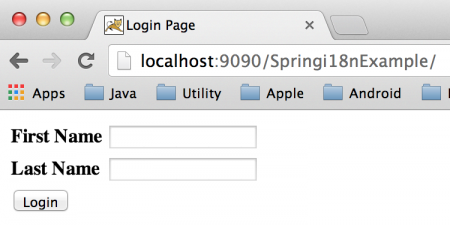
We can change the location or name of the context file by changing the web.xml configuration. Our Spring i18n application is ready, just deploy it in any servlet container. Usually, I export it as a WAR file in a standalone tomcat web server webapps directory. Here are the screenshots of our application home page with different locales. Default Home Page (en locale):
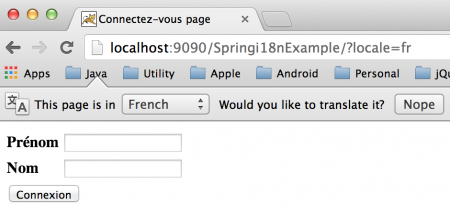
Passing Locale as parameter (fr locale):
Further requests without local):
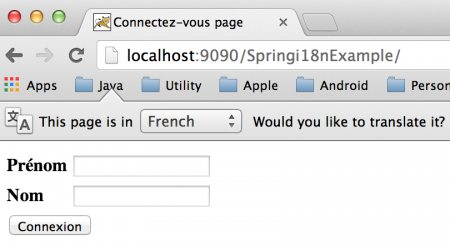
As you can see in the above image that we are not passing locale information in the client request but still our application identifies the user locale. You must have guessed by now that it’s because of the CookieLocaleResolver bean that we configured in our spring bean configuration file. However you can check your browser cookies data to confirm it. I am using chrome and below image shows the cookie data stored by the application.
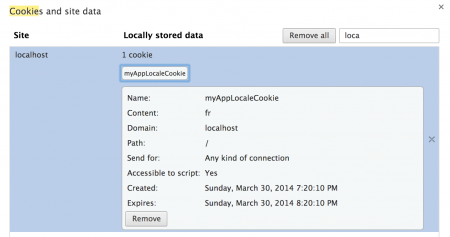
Notice that cookie expiry time is one hour i.e 3600 seconds as configured by cookieMaxAge property. If you will check server logs, you can see that locale is getting logged.
Server Log Examples:
INFO : com.journaldev.spring.HomeController - Welcome home! The client locale is en.
INFO : com.journaldev.spring.HomeController - Welcome home! The client locale is fr.
INFO : com.journaldev.spring.HomeController - Welcome home! The client locale is fr.
That’s all for the Spring i18n example application.
Test your setup on ccloud³
Sign up for ccloud³ and receive €200 starting credit for your project.