Spring Interceptor are used to intercept client requests and process them. Sometimes we want to intercept the HTTP Request and do some processing before handing it over to the controller handler methods. That’s where Spring MVC Interceptor come handy.
Spring Interceptor
Just like we have Struts2 Interceptors, we can create our own Spring interceptor by either implementing org.springframework.web.servlet.HandlerInterceptor interface or by overriding abstract class org.springframework.web.servlet.handler.HandlerInterceptorAdapter that provides the base implementation of HandlerInterceptor interface.
Matching infrastructure at centron
Node applications need somewhere to run: ccloud³ VMs with full root access from €3.11 per month – or as a managed server if you would rather not run it yourself. Rent a cloud server →
Spring Interceptor - HandlerInterceptor
Spring HandlerInterceptor declares three methods based on where we want to intercept the HTTP request.
- boolean preHandle(HttpServletRequest request, HttpServletResponse response, Object handler): This method is used to intercept the request before it’s handed over to the handler method. This method should return ‘true’ to let Spring know to process the request through another spring interceptor or to send it to handler method if there are no further spring interceptors. If this method returns ‘false’ Spring framework assumes that request has been handled by the spring interceptor itself and no further processing is needed. We should use response object to send response to the client request in this case. Object handler is the chosen handler object to handle the request. This method can throw Exception also, in that case Spring MVC Exception Handling should be useful to send error page as response.
- void postHandle(HttpServletRequest request, HttpServletResponse response, Object handler, ModelAndView modelAndView): This HandlerInterceptor interceptor method is called when HandlerAdapter has invoked the handler but DispatcherServlet is yet to render the view. This method can be used to add additional attribute to the ModelAndView object to be used in the view pages. We can use this spring interceptor method to determine the time taken by handler method to process the client request.
- void afterCompletion(HttpServletRequest request, HttpServletResponse response, Object handler, Exception ex): This is a HandlerInterceptor callback method that is called once the handler is executed and view is rendered.
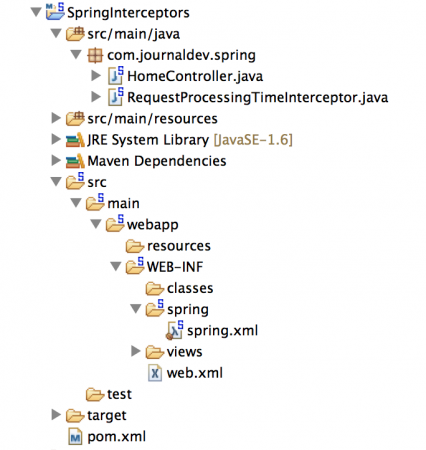
If there are multiple spring interceptors configured, preHandle() method is executed in the order of configuration whereas postHandle() and afterCompletion() methods are invoked in the reverse order. Let’s create a simple Spring MVC application where we will configure an Spring Interceptor to log timings of controller handler method. Our final Spring Interceptor example project will look like below image, we will look into the components that we are interested in.
Spring Interceptor - Controller Class
package com.journaldev.spring;

import java.text.DateFormat;
import java.util.Date;
import java.util.Locale;

import org.slf4j.Logger;
import org.slf4j.LoggerFactory;
import org.springframework.stereotype.Controller;
import org.springframework.ui.Model;
import org.springframework.web.bind.annotation.RequestMapping;
import org.springframework.web.bind.annotation.RequestMethod;

/**
 * Handles requests for the application home page.
 */
@Controller
public class HomeController {

    private static final Logger logger = LoggerFactory.getLogger(HomeController.class);

    @RequestMapping(value = "/home", method = RequestMethod.GET)
    public String home(Locale locale, Model model) {
        logger.info("Welcome home! The client locale is {}.", locale);
        //adding some time lag to check interceptor execution
        try {
            Thread.sleep(1000);
        } catch (InterruptedException e) {
            e.printStackTrace();
        }
        Date date = new Date();
        DateFormat dateFormat = DateFormat.getDateTimeInstance(DateFormat.LONG, DateFormat.LONG, locale);

        String formattedDate = dateFormat.format(date);

        model.addAttribute("serverTime", formattedDate );
        logger.info("Before returning view page");
        return "home";
    }

}
I am just adding some processing time in the execution of the handler method to check our spring interceptor methods in action.
Spring MVC Interceptor - HandlerInterceptorAdapter Implementation
For simplicity, I am extending abstract class HandlerInterceptorAdapter. HandlerInterceptorAdapter is an abstract adapter class for the HandlerInterceptor interface, for simplified implementation of pre-only/post-only interceptors.
package com.journaldev.spring;

import javax.servlet.http.HttpServletRequest;
import javax.servlet.http.HttpServletResponse;

import org.slf4j.Logger;
import org.slf4j.LoggerFactory;
import org.springframework.web.servlet.ModelAndView;
import org.springframework.web.servlet.handler.HandlerInterceptorAdapter;

public class RequestProcessingTimeInterceptor extends HandlerInterceptorAdapter {

    private static final Logger logger = LoggerFactory
            .getLogger(RequestProcessingTimeInterceptor.class);

    @Override
    public boolean preHandle(HttpServletRequest request,
            HttpServletResponse response, Object handler) throws Exception {
        long startTime = System.currentTimeMillis();
        logger.info("Request URL::" + request.getRequestURL().toString()
                + ":: Start Time=" + System.currentTimeMillis());
        request.setAttribute("startTime", startTime);
        //if returned false, we need to make sure 'response' is sent
        return true;
    }

    @Override
    public void postHandle(HttpServletRequest request,
            HttpServletResponse response, Object handler,
            ModelAndView modelAndView) throws Exception {
        System.out.println("Request URL::" + request.getRequestURL().toString()
                + " Sent to Handler :: Current Time=" + System.currentTimeMillis());
        //we can add attributes in the modelAndView and use that in the view page
    }

    @Override
    public void afterCompletion(HttpServletRequest request,
            HttpServletResponse response, Object handler, Exception ex)
            throws Exception {
        long startTime = (Long) request.getAttribute("startTime");
        logger.info("Request URL::" + request.getRequestURL().toString()
                + ":: End Time=" + System.currentTimeMillis());
        logger.info("Request URL::" + request.getRequestURL().toString()
                + ":: Time Taken=" + (System.currentTimeMillis() - startTime));
    }
The logic is really simple, I am just logging the timings of handler method execution and total time taken in processing the request including rendering view page.
Spring MVC Interceptor Configuration
We have to wire the spring interceptor to the requests, we can use mvc:interceptors element to wire all the interceptors. We can also provide URI pattern to match before including the spring interceptor for the request through mapping element. Our final spring bean configuration file (spring.xml) looks like below.
<?xml version="1.0" encoding="UTF-8"?>
<beans:beans xmlns="https://www.springframework.org/schema/mvc"
    xmlns:xsi="https://www.w3.org/2001/XMLSchema-instance" xmlns:beans="https://www.springframework.org/schema/beans"
    xmlns:context="https://www.springframework.org/schema/context"
    xsi:schemaLocation="https://www.springframework.org/schema/mvc https://www.springframework.org/schema/mvc/spring-mvc.xsd
        https://www.springframework.org/schema/beans https://www.springframework.org/schema/beans/spring-beans.xsd
        https://www.springframework.org/schema/context https://www.springframework.org/schema/context/spring-context.xsd">

    <!-- DispatcherServlet Context: defines this servlet's request-processing
        infrastructure -->

    <!-- Enables the Spring MVC @Controller programming model -->
    <annotation-driven />

    <!-- Handles HTTP GET requests for /resources/** by efficiently serving
        up static resources in the ${webappRoot}/resources directory -->
    <resources mapping="/resources/**" location="/resources/" />

    <!-- Resolves views selected for rendering by @Controllers to .jsp resources
        in the /WEB-INF/views directory -->
    <beans:bean
       >
        <beans:property name="prefix" value="/WEB-INF/views/" />
        <beans:property name="suffix" value=".jsp" />
    </beans:bean>

    <!-- Configuring interceptors based on URI -->
    <interceptors>
        <interceptor>
            <mapping path="/home" />
            <beans:bean></beans:bean>
        </interceptor>
    </interceptors>

    <context:component-scan base-package="com.journaldev.spring" />

</beans:beans>
I will not explain all other components of the web application, because we are not interested in them and they don’t have any specific spring interceptor related configuration.
Spring MVC Interceptor Application Testing
Just deploy the application in servlet container and invoke the home controller, you will see logger output something like below.
INFO : com.journaldev.spring.RequestProcessingTimeInterceptor - Request URL::https://localhost:9090/SpringInterceptors/home:: Start Time=1396906442086
INFO : com.journaldev.spring.HomeController - Welcome home! The client locale is en_US.
INFO : com.journaldev.spring.HomeController - Before returning view page
Request URL::https://localhost:9090/SpringInterceptors/home Sent to Handler :: Current Time=1396906443098
INFO : com.journaldev.spring.RequestProcessingTimeInterceptor - Request URL::https://localhost:9090/SpringInterceptors/home:: End Time=1396906443171
INFO : com.journaldev.spring.RequestProcessingTimeInterceptor - Request URL::https://localhost:9090/SpringInterceptors/home:: Time Taken=1085
The output confirms that the spring interceptor methods are executed in the order defined. That’s all for using spring interceptors,
Test your setup on ccloud³
Sign up for ccloud³ and receive €200 starting credit for your project.